


Why Shopify Plus Checkout Customization Matters for Your Jewelry Store
Shopify Plus checkout customization unlocks powerful tools to transform your jewelry store's conversion rates and revenue. Here's what you need to know:
Key Capabilities:
- For Shopify Plus merchants: Full access to Checkout UI Extensions for all checkout steps (information, shipping, payment), Shopify Functions, and Branding API
- For Basic/Standard plans: Limited to customizations on Thank You and Order Status pages only; no custom fields on core checkout steps
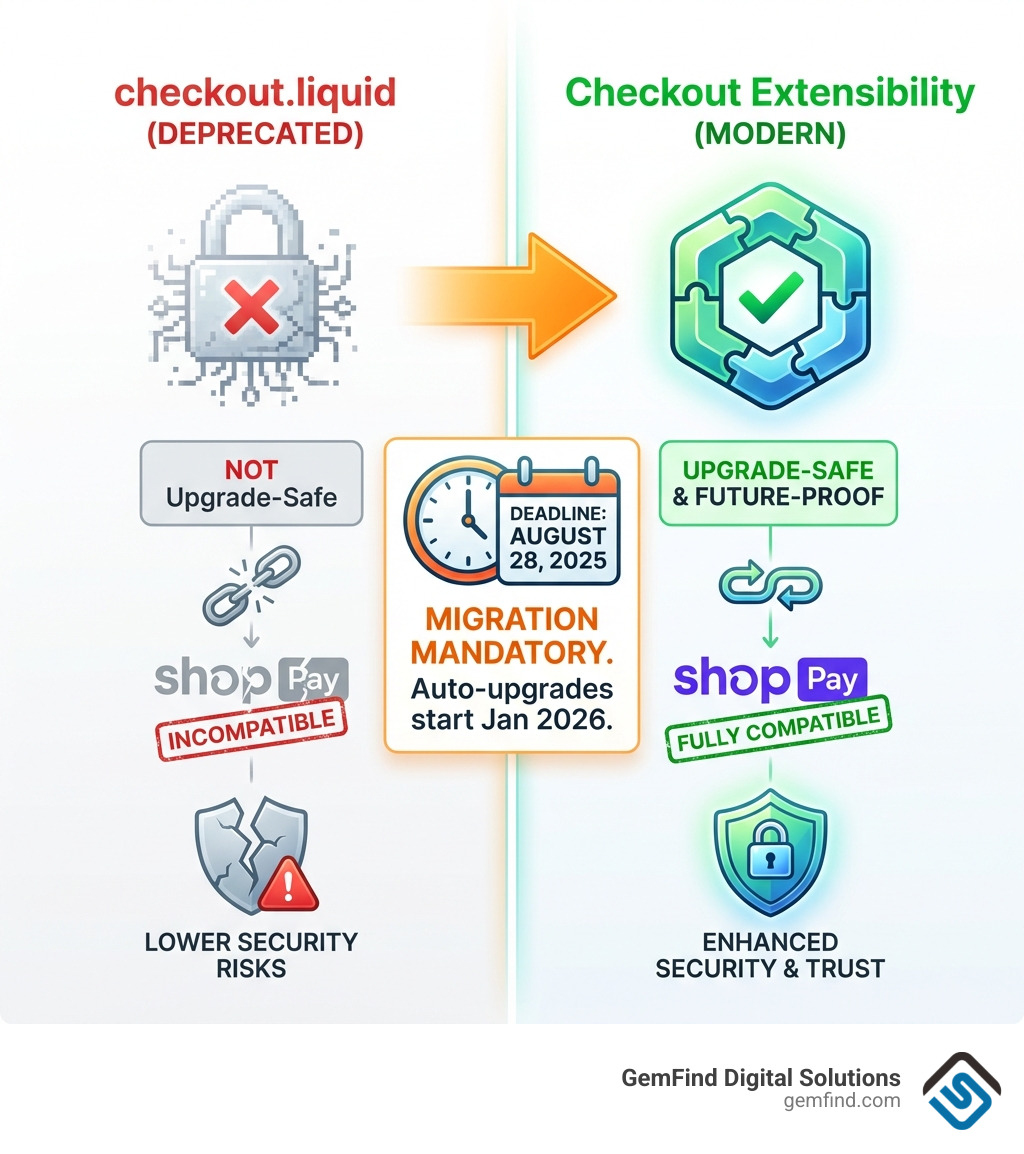
- Critical deadline: Upgrade from checkout.liquid by August 28, 2025 (auto-upgrades start January 2026)
- Modern approach: Checkout Extensibility replaces old checkout.liquid with secure, upgrade-safe customizations
Common Customizations:
- Custom fields for gift messages, delivery instructions, or engraving details
- Trust badges and security seals near payment methods
- In-checkout upsells and product recommendations
- Custom branding, colors, and typography
- Customer surveys and data capture forms
The stakes are high. Almost seven in 10 shoppers abandon their shopping carts, often due to unexpected costs, complicated processes, or lack of trust signals. Meanwhile, Shop Pay boasts a 91% higher conversion rate than traditional checkout methods. For jewelry retailers where average order values run into the thousands, even small improvements in checkout experience can mean tens of thousands in additional revenue.
I'm Anthony Arechiga, Vice President of Sales at GemFind Digital Solutions, where I've spent over 15 years helping jewelry retailers optimize their e-commerce operations, including implementing Shopify Plus checkout customization strategies that reduce cart abandonment and increase conversions. Our team has worked with hundreds of jewelers to create checkout experiences that build trust and drive sales.
Shopify Plus checkout customization vocab explained:
The Evolution of Shopify Plus Checkout Customization
For years, the gold standard for customizing the Shopify checkout was a file called checkout.liquid. It was powerful, but it was also a bit of a "wild west" scenario. Developers could inject almost any code they wanted, which often led to fragile checkouts that broke whenever Shopify released an update. If you’ve ever had a frantic call on Black Friday because your checkout button disappeared, you know exactly what we’re talking about.
Enter Checkout Extensibility. This is the new, modern foundation for Shopify Plus checkout customization. Instead of editing a single code file that can break the whole system, we now use a suite of powerful, app-based tools that operate in a "sandboxed" environment. This means your customizations are isolated from the core checkout logic, making them upgrade-safe, faster, and fully compatible with Shop Pay.
Basic vs. Shopify Plus: What’s the Difference?
While every Shopify merchant wants a beautiful checkout, the level of control varies wildly between plans. If you are on a Basic, Shopify, or Advanced plan, your options are relatively limited. You can change colors and fonts in the editor, and you can add apps to the "Thank You" and "Order Status" pages. However, you cannot add custom fields or logic to the core information, shipping, or payment pages.
For Shopify Plus merchants, the doors are wide open. You gain the ability to use Checkout UI Extensions across every single step of the journey.
| Feature | Basic / Shopify / Advanced | Shopify Plus |
|---|---|---|
| Checkout Editor Access | Yes | Yes |
| Branding (Colors/Fonts) | Basic | Advanced (via API) |
| Custom Apps on Thank You Page | Yes | Yes |
| Custom Apps on Info/Shipping/Payment | No | Yes |
| Shopify Functions (Custom Logic) | Limited | Full Access |
| Checkout Branding API | No | Yes |
| Direct Credit Card Field Edits | No | Yes |
To learn more about how these differences impact your bottom line, check out our guide on how Shopify's checkout process can produce more online sales for jewelry stores.
If you are currently using checkout.liquid, it is vital to consult the Shopify Plus upgrade guide to begin your transition. The old method is being sunsetted, and moving to the new standard isn't just about following rules—it’s about gaining access to a "supercar" version of checkout that is more secure and higher-converting.
Key Technologies Powering Modern Checkouts
To achieve a truly bespoke experience, we utilize a few core technologies that make up the Checkout Extensibility suite. Understanding these will help you communicate better with your development team or choose the right apps from the Shopify App Store.
Checkout UI Extensions
These are the building blocks of your custom checkout. They allow us to drop "blocks" of functionality into specific areas of the checkout pages. Want to add a checkbox for "Include Appraisal Certificate" or a text box for "Engraving Instructions"? UI Extensions make this possible. They are available for the information, shipping, and payment steps exclusively for Plus members.
Shopify Functions
Think of these as the "brains" behind the operation. Public apps built with Shopify Functions allow us to write custom logic for discounts, payment methods, and delivery options. For example, if you want to hide a specific shipping method for high-value diamond rings to ensure they only go via armored transport, Shopify Functions can handle that validation. You can even build custom apps with Shopify Functions to handle unique B2B pricing or complex jewelry-specific rules.
The Checkout Branding API
While the standard editor lets you change basic colors, the Checkout Branding API gives us programmatic control over the look and feel. This allows for much deeper brand alignment, ensuring that the transition from your high-end product pages to the checkout is seamless. This is a key part of maintaining the luxury feel discussed in our article on Shopify Plus for Jewelry Brands.
Web Pixels and Post-Purchase Extensions
Tracking is everything in digital marketing. Web pixel app extensions provide a secure way to collect customer events without slowing down the page. Additionally, post-purchase app extensions allow you to show offers after the customer has clicked "Pay" but before they reach the thank you page—a prime spot for offering jewelry cleaning kits or extended warranties.
Practical Strategies for Checkout Optimization
Now that we know how it works, let’s talk about what you should actually do with it. In the jewelry world, the checkout isn't just a transaction; it's the final moment of building trust before a significant purchase.
High-Impact Shopify Plus Checkout Customization Use Cases
We recommend focusing on customizations that either reduce friction or increase the Average Order Value (AOV). Here are some of our favorite strategies:
- Gift Messaging & Wrapping: Jewelry is the ultimate gift. Adding a UI extension that allows customers to type a personalized message or select premium gift wrapping directly in the checkout is a game-changer.
- Trust Badges: For high-ticket items, customers need reassurance. Placing trust badges or "Conflict-Free Diamond" certifications near the payment button can significantly reduce last-minute cold feet.
- In-Checkout Upsells: Use Checkout UI extensions to suggest a matching pair of earrings or a jewelry polishing cloth. Since the customer already has their card out, these small additions feel natural rather than intrusive.
- Loyalty Integration: If you have a rewards program, let customers see their points balance or apply rewards directly within the checkout flow. This is a core part of successful Shopify Plus loyalty programs.
Capturing Data with Custom Forms and Fields
Sometimes you need more than just a name and address. Maybe you need to know the date of the anniversary the customer is celebrating, or perhaps you want to run a quick "How did you hear about us?" survey.
With Shopify Plus checkout customization, you can add custom forms that feed directly into the order notes or customer tags. This data is invaluable for Shopify Plus email marketing, allowing you to send personalized follow-ups based on the customer’s specific needs.
When using these apps, it’s important to be transparent about data. Most apps will require access to customer and order data to function. You can typically find these details in the developer's privacy policy.
Pro-Tip: Use the "Checkout and accounts editor" in your Shopify admin to manage these blocks. You can drag and drop them into place, preview how they look on mobile vs. desktop, and even test them in a "draft" state before they go live to your customers. For those looking for a versatile tool, Checkout Blocks is a popular choice that offers many of these features in a no-code format.
Migrating to the New Checkout Standard
If you are a Shopify Plus merchant still using the old checkout.liquid system, the clock is ticking. Shopify has officially moved toward a more stable future, and that means the old ways are going away.
Preparing for the Shopify Plus Checkout Customization Deadline
Mark your calendars: August 28, 2025 is the final deadline for upgrading your Information, Shipping, and Payment pages. If you haven't migrated by then, your customizations will become non-editable, and you may lose access to certain features. Even more critically, auto-upgrades will begin in January 2026, which could potentially break legacy scripts that haven't been transitioned to the new system.
The Migration Checklist:
- Audit Your Current Setup: Go to Settings > Checkout in your Shopify admin. If you see a warning about deprecated versions, you are still on the old system.
- Review the Customizations Report: Shopify provides an upgrade guide that categorizes your existing scripts. This will tell you what can be replaced by a standard feature and what needs a custom app.
- Replace Scripts with Web Pixels: Move your tracking scripts (Google Analytics, Meta Pixel, etc.) to the new Web Pixels API. This is much more secure and prevents third-party code from interfering with your checkout speed.
- Leverage UI Extensions: Instead of hacking the liquid code, use UI extensions to recreate your custom fields and banners.
- Test in Draft: One of the best features of the new system is the ability to create "Draft" configurations. You can build your entire new checkout experience and test it thoroughly without affecting your live store.
Frequently Asked Questions about Shopify Checkout
What happens if I miss the August 2025 deadline for checkout.liquid?
If you miss the deadline, your checkout.liquid file will essentially be "locked." You won't be able to make changes to it, and Shopify will eventually force an auto-upgrade to the standard Checkout Extensibility. This could result in your custom fields or specialized logic disappearing overnight. It’s much better to manage the transition yourself now than to let an automated system do it for you later!
Can I add custom forms without coding on Shopify Plus?
Yes! Many apps in the Shopify App Store allow you to add custom fields, checkboxes, and banners using a simple drag-and-drop interface. For more complex logic, like setting payment terms at checkout, you might need a developer, but the majority of common jewelry store needs (like gift notes or "how did you hear about us" surveys) can be done with no-code apps.
Why is Checkout Extensibility more secure than the old method?
The old checkout.liquid method allowed code to run directly on the page, which could potentially expose sensitive customer information if a third-party script was compromised. Checkout Extensibility uses a "sandboxed" approach. This means the custom code runs in its own isolated container. It can interact with the checkout, but it can't "see" or "steal" sensitive data like credit card numbers. It’s safer for you and much safer for your customers.
Conclusion
At GemFind Digital Solutions, we understand that for a jewelry brand, the checkout is more than just a place to enter a credit card number—it's the final handshake of a luxury experience. With over 25 years of industry-specific expertise, we’ve seen the evolution of e-commerce firsthand. As a proud Shopify Plus Partner, we specialize in helping jewelers navigate these technical transitions, ensuring that your Shopify Plus checkout customization is not only beautiful but also high-performing and secure.
Whether you need to integrate your Edge POS system, add specialized financing options like Affirm or Wells Fargo, or simply want to ensure your migration from checkout.liquid is seamless, we are here to help.
Ready to make your checkout shine? Explore our Shopify Plus services and let’s build a checkout experience that reflects the brilliance of your brand.


