



Why Speed Matters for Your Jewelry Store's Success
Shopify Plus performance optimization is the process of making your online jewelry store load faster and run smoother to increase sales and keep customers happy. Here's what you need to know:
Key Optimization Areas:
- Images - Compress jewelry photos to WebP format and use lazy loading
- Apps - Remove unused apps that slow down your store
- Code - Minify CSS and JavaScript files for faster loading
- Caching - Use browser caching and Shopify's built-in CDN
- Monitoring - Track Core Web Vitals (LCP, INP, CLS) regularly
Target Performance Metrics:
- Largest Contentful Paint (LCP): Under 2.5 seconds
- Interaction to Next Paint (INP): Under 200 milliseconds
- Cumulative Layout Shift (CLS): Under 0.1
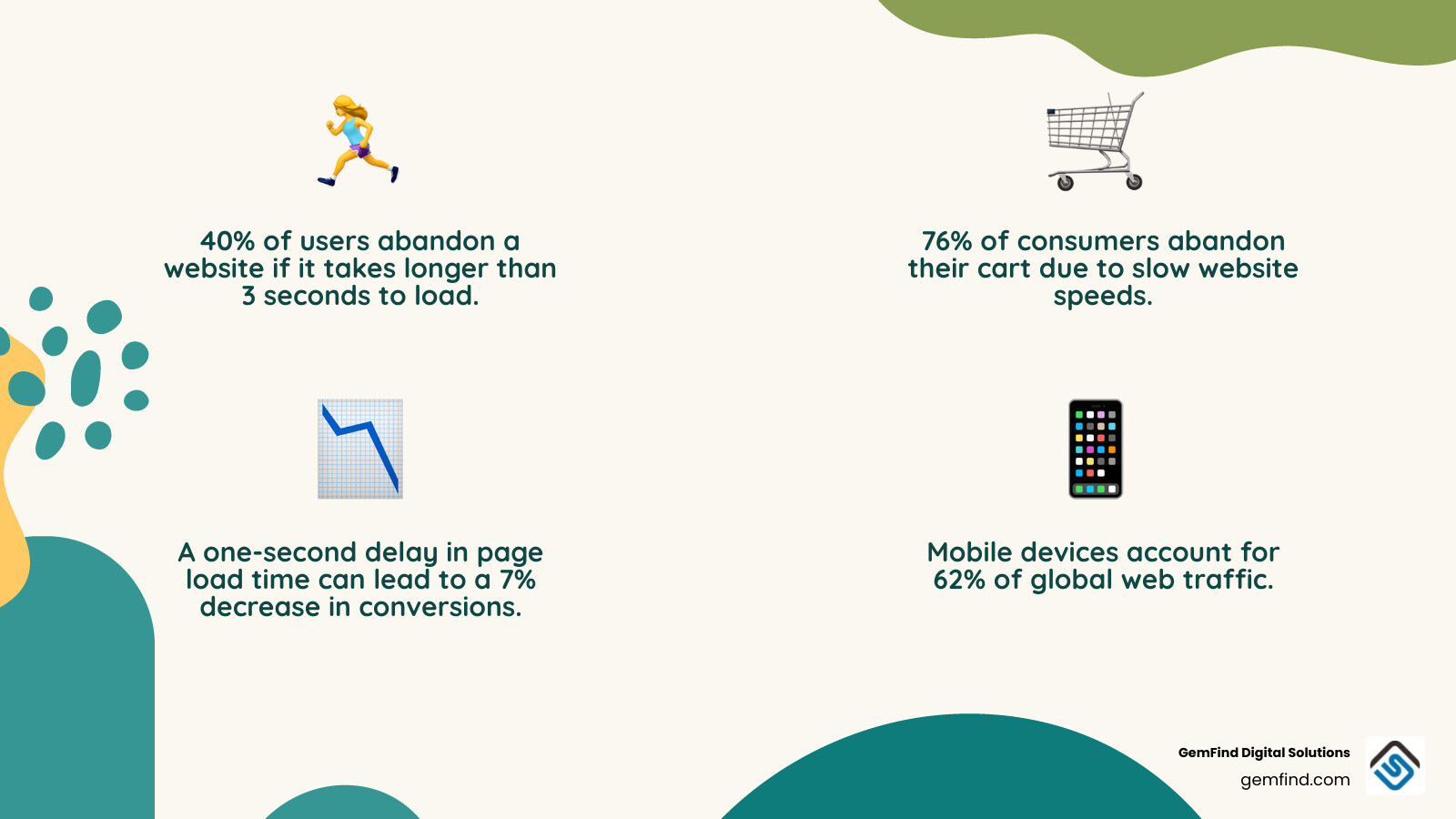
Imagine this: A customer finds your stunning diamond ring through a Google search. They click through, eager to see more. But your page takes four seconds to load. Research shows that 40% of users abandon a website if it takes longer than 3 seconds to load, and 76% of consumers have abandoned a cart due to slow website speeds-with 39% leaving behind carts valued over $100.
For jewelry stores, where average order values can reach thousands of dollars, every second of delay can mean significant revenue loss. The research is clear: a one-second delay in page load time can lead to a 7% decrease in conversions. When you're selling high-value items like engagement rings or luxury watches, that's money you can't afford to lose.
The good news? Shopify Plus comes with built-in performance features like automatic image optimization, a global CDN through Cloudflare, and file minification. But to truly compete in today's market-where mobile devices account for 62% of global web traffic-you need to go beyond the basics.
I'm Anthony Arechiga, Vice President of Sales at GemFind Digital Solutions, where I've spent over 15 years helping jewelry retailers optimize their e-commerce platforms, including implementing Shopify Plus performance optimization strategies that directly increase conversion rates and customer satisfaction. Throughout my career, I've seen how proper performance tuning transforms struggling online stores into thriving digital businesses.
This guide will walk you through the exact steps to make your Shopify Plus store load faster, rank higher in Google, and convert more browsers into buyers.
Shopify Plus performance optimization vocabulary:
The Business Impact of Shopify Plus Performance Optimization
When we talk about Shopify Plus performance optimization, we aren't just talking about technical "geek speak." We are talking about the lifeblood of your business. In the luxury jewelry world, the digital experience must mirror the in-store experience. If a customer walks into your showroom and you take five minutes to find the key to the display case, they’re going to walk out. The same applies to your website.
According to Liquid Web research on site speed and cart abandonment, slow websites are a primary driver for lost revenue. For an enterprise-level store, a mere 1-second improvement in Largest Contentful Paint (LCP) can drive a 2-4% increase in conversion rates. Conversely, that same one-second delay can cause a 7% drop in sales. If your store does $1 million in annual online sales, that "tiny" delay just cost you $70,000.
Mobile Engagement is the New Standard
We must remember that Why Jewelers Should Consider Switching to Shopify This Year is often driven by the need for better mobile experiences. Currently, 62% of global web traffic comes from mobile devices. These users are often on cellular networks with higher latency. A site that feels "okay" on a high-speed office desktop might feel like molasses on a smartphone at a coffee shop.
SEO and Organic Visibility
Google has made it very clear: speed is a ranking factor. Shopify Plus for Jewelry Brands often achieve 35-50% higher organic conversion rates compared to standard implementations because they have the resources to fine-tune their technical SEO. If your store is slow, Google’s PageRank algorithm—which prioritizes site performance—will push you down the search results. In fact, websites on the first page of Google load in an average of 1.65 seconds.
Core Web Vitals and Technical Benchmarks
To win at Shopify Plus performance optimization, we need to understand how Google measures "speed." It's no longer just about the "time to load" spinning wheel; it's about the user's perception of stability and responsiveness. Google uses a set of metrics called Core Web Vitals Web performance focuses on optimizing user experience. Currently, web performance focuses on three major areas which are also reflected in theCore Web Vitals:.
You can monitor these directly in your Shopify admin using the Web Performance Dashboard &Reports.
The Big Three Metrics
- Largest Contentful Paint (LCP): This measures loading speed. It’s the time it takes for the largest image or text block to become visible. For a jeweler, this is often your high-resolution hero banner featuring your latest collection.
- Interaction to Next Paint (INP): As of March 2024, INP officially replaced First Input Delay (FID) as a Core Web Vital. It measures how quickly your site responds when a user clicks a button or taps a menu.
- Cumulative Layout Shift (CLS): This measures visual stability. Have you ever tried to click a link, only for the page to jump and cause you to click an ad instead? That’s a high CLS. We want to avoid that to prevent customer frustration.
Beyond speed, security is a foundational part of performance. Ensuring you How to Set Up SSL in Shopify for Jewelry Websites is handled correctly ensures that data exchanged is encrypted without adding unnecessary latency.
Shopify Plus performance optimization benchmarks
For an optimal user experience and high search rankings, we aim for the following "Good" thresholds:
- LCP: Under 2.5 seconds.
- INP: Under 200 milliseconds.
- CLS: Under 0.1.
Achieving these benchmarks allows you to Thrive Online as a Jeweler with Shopify: Boost Sales and Build Customer Trust because customers feel the site is high-quality and reliable.
Strategic Optimization Techniques for Enterprise Stores
Now that we know what to measure, how do we actually "make the store fly"? For Shopify Plus merchants, we have access to enterprise-grade tools, but we also deal with more complex themes and larger catalogs.
Image Optimization: The Low-Hanging Fruit
Images usually account for the bulk of a webpage's weight. Shopify Plus stores use an image CDN which automatically optimizes images. However, we can go further:
- WebP Format: Use modern formats like WebP or AVIF. They provide superior compression compared to JPEG or PNG.
-
Lazy Loading: Use the
loading="lazy"attribute for images below the fold. This tells the browser, "Don't bother downloading this diamond necklace photo until the user actually scrolls down to it." -
Responsive Images: Use the
image_tagLiquid filter to serve different sizes based on the user's screen width.
Liquid and Code Efficiency
If your theme is old or poorly coded, it can lead to "Liquid bottlenecks." debugging common causes for slow loading in Shopify Liquid storefronts often reveals nested loops (loops inside loops) that force the server to work overtime.
We also recommend:
- Minification: Shopify Plus automatically minifies CSS and JS, but using tools like UglifyJS or CSSNano during development ensures your custom scripts are as lean as possible.
- HTTP/3 Support: Shopify supports HTTP/3, which is faster and more reliable than older protocols. Ensure your theme isn't forcing old loading patterns.
App Rationalization
Every app you install adds a "tax" to your site speed. We often see jewelry stores with 20+ apps, many of which are doing things that could be done with simple Liquid or CSS. We suggest you Boost Your Jewelry Store's Online Presence with Shopify by auditing your apps and removing any that aren't providing a clear ROI. You can find Must-Have Shopify Apps for Jewelers that are built specifically for performance.
Shopify Plus performance optimization strategies
- Prioritize the Critical Rendering Path: Ensure that the CSS needed for the top of the page (the "above-the-fold" content) loads first.
-
Async and Defer JavaScript: Use
asyncordeferattributes on your script tags. This prevents JavaScript from blocking the rest of the page from rendering. -
Preload Key Resources: Tell the browser to start downloading your main font or hero image immediately using
<link rel="preload">.
If you are planning a move, check out our Tips for Migrating Your Jewelry Store's Website to Shopify This Year to ensure you don't lose performance or SEO ranking during the transition.
Advanced Infrastructure and Headless Commerce
For the most ambitious jewelry brands, standard theme architecture might not be enough. This is where we look at "Headless Commerce." By decoupling the frontend (the part the user sees) from the backend (Shopify's engine), you gain total control over performance.
| Feature | Traditional Liquid Theme | Headless (Hydrogen/Next.js) |
|---|---|---|
| Rendering | Server-side (Liquid) | Client-side or Edge-side |
| Speed Potential | High (with optimization) | Ultra-High (Instant loads) |
| Complexity | Moderate | High |
| Customization | Limited by Shopify's framework | Unlimited |
| Infrastructure | Hosted by Shopify | Hosted on Oxygen or Vercel |
Leveraging the Global Infrastructure
Shopify Plus merchants benefit from fast, global servers and a CDN run by Cloudflare. This ensures that whether your customer is in New York or London, your site loads quickly. You can always check the Shopify Status to ensure the platform is running at peak efficiency.
Advanced developers can also use Edge Functions. These are small pieces of code that run on the CDN server itself (closer to the user) rather than Shopify's main servers. This can drastically reduce the Time to First Byte (TTFB).
Optimizing these advanced layers is how Shopify's Checkout Process Can Produce More Online Sales for Jewelry Stores. When the checkout is "instant," there is no time for the customer to second-guess their luxury purchase.
Frequently Asked Questions about Shopify Plus Speed
How do third-party apps affect my site speed?
Third-party apps are the most common "speed killers." They often inject large JavaScript files that block the page from loading. This is called "parser-blocking." We recommend using the Shopify Theme Inspector for Chrome to see exactly which apps are slowing you down.
For example, while you might want Shopify Apps Created for Jewelers to Reach More Engagement Ring Clients, you should ensure they are implemented using "App Blocks" (Online Store 2.0) which are much more performance-friendly than old-school script tags.
What tools should I use to monitor performance?
We recommend a three-pronged approach:
- PageSpeed Insights: Great for a quick lab test of any URL.
- Shopify Web Performance Dashboard: Uses real-world data from your actual customers.
- Lighthouse: Built into Chrome DevTools, it’s perfect for developers to test changes before they go live.
If you find your scores are consistently low, it might be time for Revamping Your Jewelry Store’s Website for the New Year: Benefits of Working with a Certified Shopify Partner.
How can I prepare for peak traffic events like BFCM?
Black Friday Cyber Monday (BFCM) can bring 10x to 100x your normal traffic. While Shopify Plus is built to handle this, your theme might not be.
- Stress Testing: Use tools like WebPageTest to simulate high-load scenarios.
- Simplify the Homepage: During peak events, consider a "leaner" version of your homepage to ensure it stays up under pressure.
- Cache Everything: Ensure your collection pages are heavily cached so they don't have to rebuild for every single visitor.
Proper preparation helps you Maximize Leads with a Shopify Website for Your Jewelry Business even when the traffic is at its highest.
Conclusion
Shopify Plus performance optimization is not a "one-and-done" project. It is a continuous strategy. As you add new products, launch marketing campaigns, and install new apps, your site speed will naturally fluctuate. Investing in long-term speed optimization isn't just about technical vanity; it’s about providing a luxury experience that respects your customer's time and earns their trust.
At GemFind Digital Solutions, we have over 25 years of experience specifically in the jewelry industry. We understand the unique challenges of displaying high-detail diamonds and intricate metalwork while maintaining a lightning-fast site. As a certified Shopify and Google Partner, we don't just "guess" at speed—we use data-driven strategies to ensure your store outshines the competition.
Whether you need a full site audit, a migration from a legacy platform, or advanced headless architecture, we are here to help.
Ready to Scale your brand with Shopify Plus? Let’s make your store fly. Reach out to GemFind Digital Solutions today for a performance consultation custom to your jewelry brand.


