


Email Automation: The Smarter Way to Stay in Touch With Every Customer
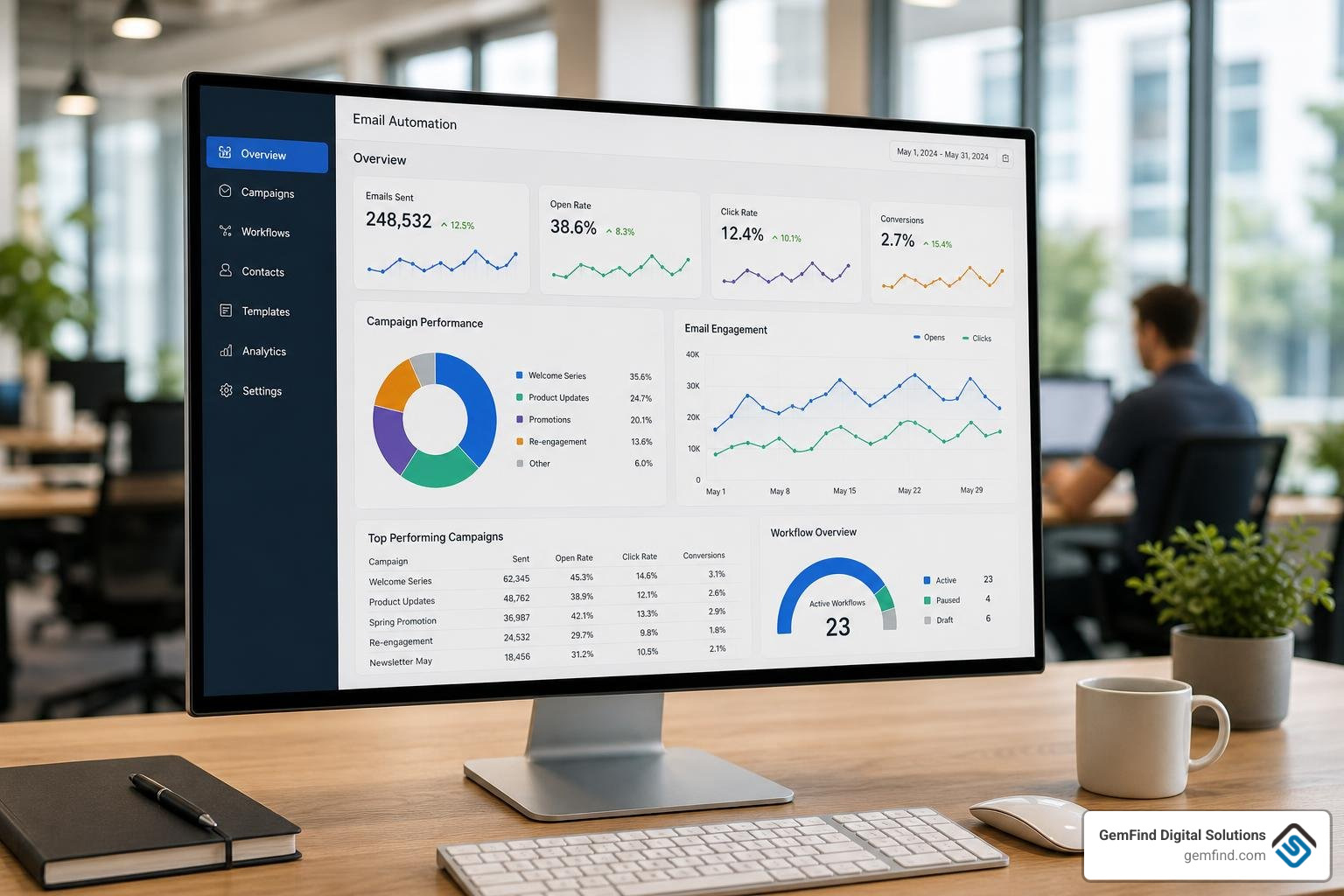
Email automation is the process of sending targeted emails to customers automatically — based on their actions, behaviors, or a set schedule — without having to manually hit "send" each time.
Here's a quick snapshot of what it covers:
| Topic | Quick Answer |
|---|---|
| What it is | Software that sends the right email to the right person at the right moment, automatically |
| How it works | Triggers (like a signup or abandoned cart) fire emails based on rules or AI logic |
| Who it's for | Any business — from solo jewelry store owners to large e-commerce brands |
| Top benefit | Saves time, increases revenue, and builds customer relationships at scale |
| Common examples | Welcome series, abandoned cart reminders, win-back campaigns, post-purchase follow-ups |
As a jewelry store owner, your time is already stretched thin. You're managing inventory, helping customers on the floor, and trying to keep up with your online store — all at once. Manually sending follow-up emails to every customer who browsed your site or left something in their cart simply isn't realistic.
That's exactly the problem email automation solves.
Instead of you chasing customers, your email system does it for you — around the clock, without missing a beat.
The numbers back this up. Welcome emails alone generate up to 320% more revenue per email than standard promotional messages. And businesses that use automation software generate twice as many leads as those that don't.
This guide will walk you through everything you need to know — from how automation works technically, to which campaigns to set up first, to how to keep your emails out of the spam folder.
My name is Morgan Price, and I'm a digital marketing strategist with hands-on experience building email automation systems that drive real, measurable results for retail and e-commerce businesses. In this guide, I'll share the same practical framework I use to help businesses like yours turn email automation into a consistent revenue channel.
What is Email Automation and How Does It Work?
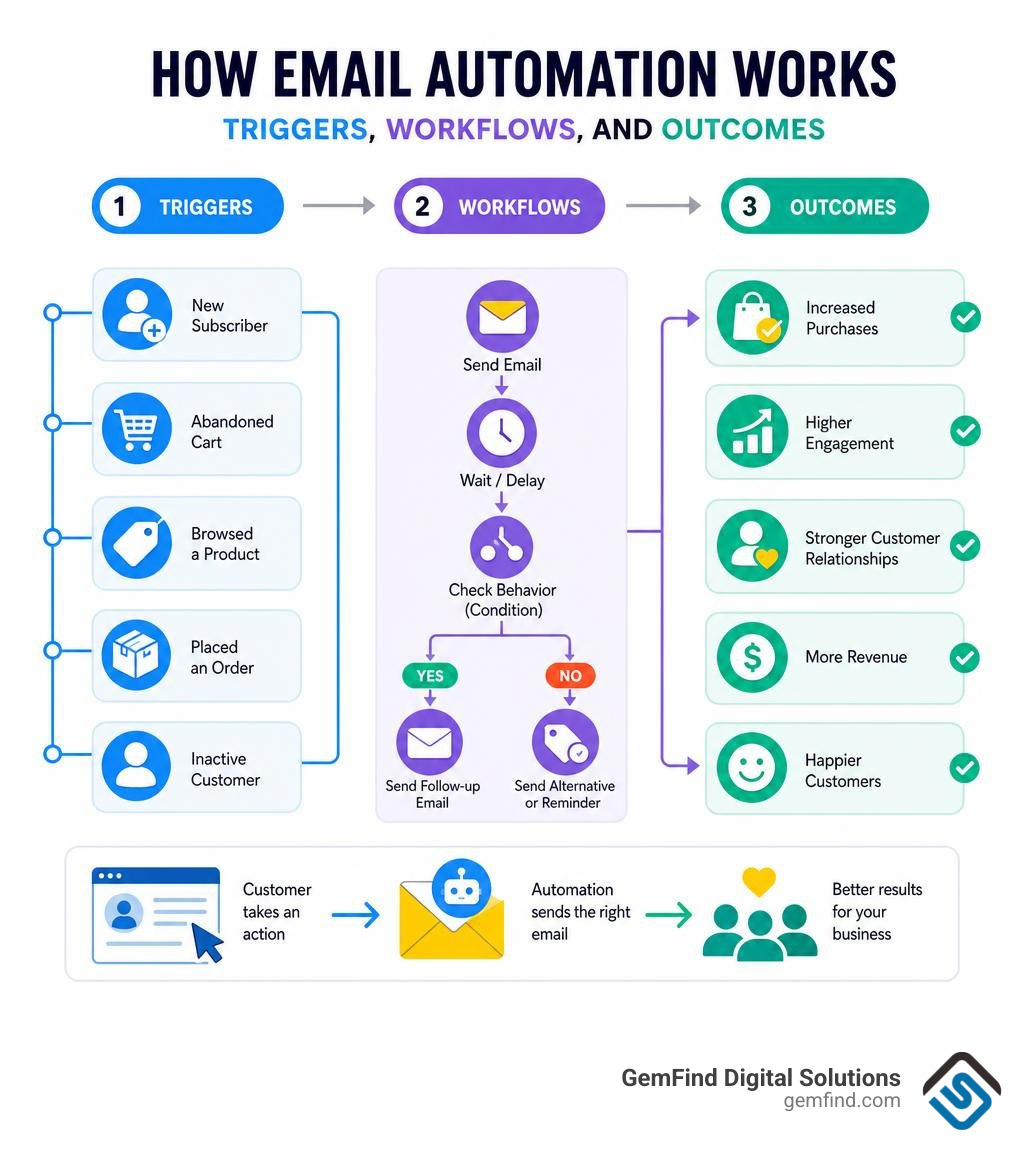
To understand how email automation works, it helps to think of it as a series of digital "if-then" statements running silently in the background of your business. Instead of manually selecting a list of contacts and drafting a message every time you want to communicate, you build a system once that reacts dynamically to real-time customer behavior.
At its core, the technical mechanics of email automation rely on three primary components:
- Triggers: The specific events or behaviors that kick off the automation. This could be a customer signing up for your newsletter, viewing a specific diamond engagement ring on your website, or reaching a milestone like their wedding anniversary.
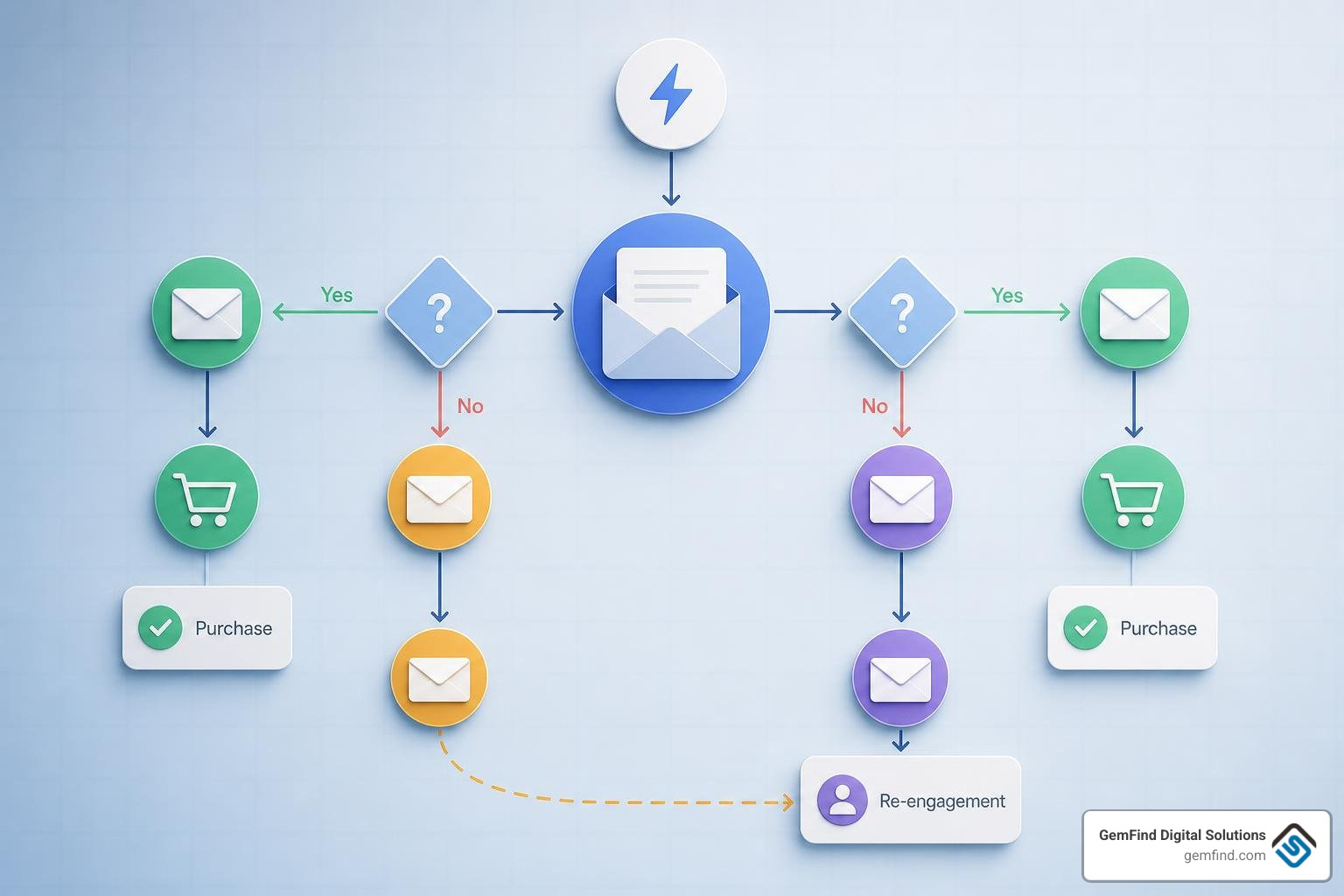
- Conditional Logic (Workflows): The rules that dictate what happens after a trigger fires. For example, if a subscriber opens your first email, the system waits three days and sends Email A. If they do not open it, the system sends Email B with a different subject line.
- Data Integration and Webhooks: For automation to feel seamless, your email platform must talk directly to your website analytics, e-commerce platform, and customer relationship management (CRM) system. Webhooks are frequently used to send real-time notifications between these platforms. When a customer adds a gold necklace to their cart and leaves, a webhook instantly alerts your email system to queue up an abandoned cart sequence.
By bridging the gap between online browsing behavior and your messaging queue, you ensure that customers receive highly relevant information exactly when they are most interested. For a deeper look at how to structure these systems specifically for retail jewelry environments in July 2026, take a look at our Jewelry Marketing Automation Guide 2026.
Difference Between Email Automation and Email Marketing Automation
While they sound nearly identical, traditional email marketing and advanced email automation serve entirely different purposes in your marketing mix. Mixing them up can lead to campaigns that underdeliver or feel intrusive to your audience.
Traditional email marketing campaigns are highly manual, scheduled, and episodic. These are your standard weekly newsletters, holiday promotion blasts, or one-off announcements. You design the email, select a broad list of subscribers, and send it to everyone at a specific date and time. It is a "one-to-many" approach.
In contrast, email automation is behavior-driven, continuous, and highly individualized. It operates as a "one-to-one" channel. Once you activate an automated workflow, it runs 24/7 in the background, sending tailored messages to individual users based on their unique actions.
This includes transactional emails—such as order confirmations, shipping updates, and password resets—which are sent instantly via API or SMTP relay to keep customers informed. Unifying your transactional sends and marketing flows under a single, cohesive platform like Mailazy — Marketing automation that customers actually open ensures that your branding remains consistent and your delivery speeds stay under two seconds, which significantly reduces customer support inquiries.
How AI Enhances Email Automation Beyond Rules
Historically, email automation was bound by rigid, static rules. If a user did not complete step A, they could never progress to step B. However, as we navigate 2026, artificial intelligence has completely transformed how modern brands communicate, moving us from static drip sequences to dynamic "next-best-everything" decisioning.
Instead of relying solely on manual rules, AI enhances automated campaigns in several powerful ways:
- Predictive Engagement: Rather than guessing when to email your list, AI analyzes individual historical behavior to determine when a specific subscriber is most likely to open and click. It optimizes send times on an individual level.
- True Brand Voice Generation: Traditional AI copywriters can sound robotic. Modern AI engines can be trained directly on your brand’s historical archive of successful newsletters and product descriptions, generating drafts that sound exactly like your in-house team.
- Dynamic Content and Asset Extraction: Platforms can now automatically extract design assets—like your exact brand colors, fonts, and logos—directly from your store's website URL. Tools like AI Email Generator: Automate Writing & Replies with Manus even allow you to scale personalized bulk outreach by taking a simple CSV contact list and combining it with live web research to inject highly personalized, context-aware details into every single email.
By shifting the logic from "who qualifies for this trigger?" to "who is genuinely likely to respond to this offer?", AI ensures your automated campaigns remain highly relevant and incredibly human.
Key Benefits of Automating Your Email Campaigns
Implementing email automation is one of the most effective ways to scale your business operations without inflating your overhead costs. When you let technology handle the repetitive tasks, your brand experiences several transformative benefits:
- Unmatched Team Efficiency: Instead of spending hours importing lists, drafting individual follow-ups, and scheduling weekly blasts, your marketing team can focus on big-picture strategy, creative assets, and high-value customer service.
- Highly Scalable Lead Generation: Businesses utilizing automation software generate twice as many leads as those without it. By setting up automated lead capture and nurturing sequences, you can build relationships with thousands of prospects simultaneously.
- Deconstruct the Online-Offline Divide: For physical retail stores, automation bridges the gap between digital interest and physical sales. By integrating your online store with physical systems, you can automatically nurture local web visitors and turn them into in-store appointments. To explore how to leverage this for your showroom, read about How Marketing Automation Can Increase Ecommerce Jewelry Sales In Store Leads.
- Sustained Revenue Growth: Because automated emails are triggered by real-time interest, they capture high-intent moments. Whether it is an immediate coupon code for a new subscriber or a timely reminder to a shopper who abandoned their cart, automation consistently drives conversions while you sleep.
Essential Features to Look For in Automation Software
With dozens of email platforms on the market, choosing the right software can feel overwhelming. To ensure your platform can support sophisticated, high-yielding campaigns, look for these essential features:
- Visual Workflow Builder: A drag-and-drop canvas that allows you to easily map out your customer journeys, set delays, and build conditional branching logic.
- Real-Time Audience Segmentation: The ability to dynamically group contacts based on purchase history, browsing behavior, and engagement levels, rather than relying on static, manual tags.
- Robust Deliverability Tools: Look for platforms that offer built-in sender reputation monitoring, spam shielding, and automated IP warming schedules. A high-performing platform like SendX: Email Marketing Software | Unlimited Sends, AI Deliverability features an AI-powered sending engine that automatically adjusts throttling and monitors ISP feedback to maintain a 95% to 98% inbox placement rate.
- Bi-Directional Integrations: Your email tool must connect seamlessly to your website, e-commerce platform, and point-of-sale (POS) systems. This ensures that when a customer makes an in-store purchase, their online profile is instantly updated, preventing them from receiving irrelevant promotional emails for products they already bought.
High-Converting Automated Email Campaigns to Set Up Today
If you are new to email automation, you do not need to build dozens of complex workflows overnight. Instead, focus on mastering a few high-impact sequences that target key transition points in the customer lifecycle.
By starting with these core flows, you will address the most common drop-off points in your sales funnel and start recovering lost revenue immediately. For a deep dive into recovering abandoned sales, check out our Abandon Cart Recovery Tips.
Welcome Series Flow
The moment someone subscribes to your mailing list is the exact moment their interest in your brand is at its absolute peak. In fact, 74% of people fully expect to receive a welcome email immediately after signing up. If you make them wait days for a manual newsletter, you have missed a massive window of opportunity.
Welcome messages get four times more reads and five times more clicks than standard marketing emails. More importantly, they generate up to 320% more income per email than generic promotional messages.
Think of a welcome email as a thank-you note after a great job interview—there is no law saying you have to send one, but people definitely notice and feel underappreciated when you do not. Use your welcome series to introduce your brand's unique story, showcase your finest collections, set expectations for future emails, and offer a small incentive (like a first-purchase discount) to encourage that initial transaction.
Abandoned Cart Recovery
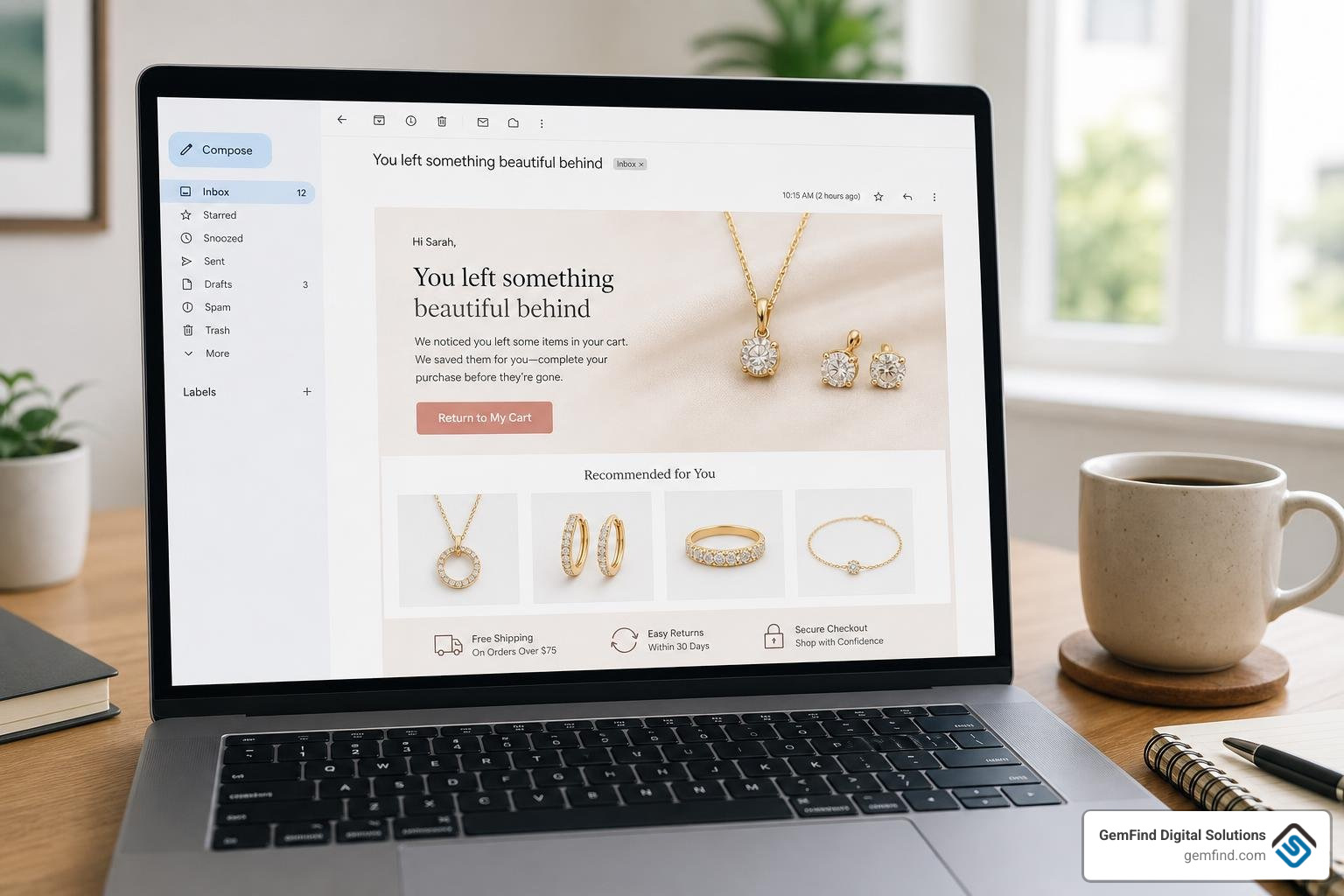
On average, about 70% of e-commerce shoppers abandon their shopping carts before completing their purchase. This represents an enormous amount of lost revenue left sitting on the table. An automated abandoned cart recovery sequence is your digital safety net, designed to bring those high-intent shoppers back to finish the job.
Instead of sending a generic, boring reminder, make your recovery emails highly dynamic. If you include personalized recommendations or showcase the exact items they left in their cart, you can increase sales per email opening by an average of 150%.
Keep your discounts strategic and sparing; if you offer a 10% coupon immediately every time someone leaves a cart, savvy shoppers will quickly learn to game your system. Start with a helpful, customer-service-oriented reminder ("Did your internet drop out?"), follow up with social proof or reviews of the product they liked, and only offer a discount as a last resort in your final email.
Re-engagement and Win-Back Campaigns
Over time, a portion of your email list will naturally go cold. Subscribers stop opening your emails, their interests shift, or they simply get distracted by crowded inboxes. Sending constant promotional blasts to these inactive users hurts your sender reputation and wastes your marketing budget.
A highly personalized win-back campaign is designed to reactivate these sleeping subscribers or cleanly offboard them to maintain list hygiene. Avoid generic, lazy subject lines like "Hey, we haven't heard from you in a while"—these are incredibly likely to head straight to the trash.
Instead, use their past purchase history to send highly tailored, product-specific recommendations. For example, if a customer bought a silver jewelry cleaning kit a year ago, trigger an automated email offering a special discount on a premium jewelry polishing cloth or a complimentary in-store inspection. If they still do not engage after a few attempts, it is time to remove them from your active lists to protect your overall deliverability.
Best Practices for Deliverability and Avoiding Spam Filters
The most beautiful, well-written automated email in the world is completely useless if it ends up buried in your customer's spam folder. To make sure your campaigns consistently land in the primary inbox, you must actively protect your sender reputation and follow modern deliverability best practices.
First, avoid using "spammy" subject lines. This means steering clear of writing in ALL CAPS, overusing exclamation points, or relying heavily on high-pressure promotional buzzwords like "FREE," "BUY NOW," or "GUARANTEED." For actionable advice on crafting high-performing lines, read our guide on How To Effectively Improve Your Email Open Rates.
Additionally, always give your readers an incredibly clear, one-click unsubscribe link in every footer. Not only is this a legal requirement under consumer protection laws, but it is also much better for a subscriber to unsubscribe than to flag your message as spam because they could not find an easy way to opt out.
Technical Setup and Authentication
Behind every successful email campaign is a robust technical foundation. To prove to major mailbox providers (like Google and Yahoo) that you are a legitimate sender and not a malicious spammer, you must configure three key authentication protocols in your domain's DNS settings:
- SPF (Sender Policy Framework): A list of the specific servers authorized to send emails on behalf of your domain.
- DKIM (DomainKeys Identified Mail): A digital signature added to your email headers, verifying that the email was not altered in transit.
- DMARC (Domain-based Message Authentication, Reporting, and Conformance): A policy that tells receiving servers exactly how to handle emails that fail SPF or DKIM checks.
When you migrate to a new email platform, it is also vital to practice "IP warming." This means gradually increasing your email volume over a period of 30 to 45 days, starting with your most active subscribers, to establish a trustworthy reputation with ISPs.
Using lightweight, privacy-centric tools like Mailmeteor - Send personalized emails and manage replies at scale allows you to send automated sequences directly from your native Google Workspace or Outlook accounts. By adding built-in sending delays between messages, these tools mimic natural human behavior, helping you respect native provider sending limits (such as Google's 2,000-per-day cap) and maintain exceptional deliverability without triggering automated spam blocks.
Frequently Asked Questions about Email Automation
To help you navigate your email automation journey, we have compiled and answered some of the most common questions businesses ask when setting up their systems.
| Feature / Aspect | Single Email Automation | Workflow Series (Drip Campaigns) |
|---|---|---|
| Structure | A standalone, one-off email | A multi-step sequence of several emails |
| Trigger | Instantaneous, specific action (e.g., invoice sent) | Initial event followed by time delays and logic |
| Best Used For | Transactional receipts, one-day-only flash sales | Welcome sequences, lead nurturing, customer onboarding |
| Complexity | Low — quick to set up and modify | Medium to High — requires mapping paths and delays |
| Goal | Immediate notification or prompt action | Building long-term relationships and gradual education |
What is the difference between single email automation and a workflow series?
Single email automation is a standalone message triggered by a specific, immediate action. A classic example is a transactional order confirmation or a one-day-only flash sale notification. Once that specific email is sent, the interaction is complete.
A workflow series (or drip campaign) is a multi-step sequence of emails designed to guide a customer through a longer journey. It uses conditional logic and timed delays to send a series of related messages based on how the user interacts with each previous email. For example, a welcome series might send an introduction on day one, a brand-story video on day three, and a product showcase on day seven.
How do you measure the success of automated email campaigns?
Measuring success goes far beyond simply tracking open rates. To understand the true ROI of your automation, you should monitor a balanced mix of key performance indicators:
- Open Rates: Indicates whether your subject lines are engaging and if your emails are successfully landing in the main inbox.
- Click-Through Rates (CTR): Measures how compelling your email content and call-to-action buttons are to your readers.
- Conversion Rate: The percentage of recipients who take the ultimate desired action, such as making a purchase or booking an in-store design consultation.
- Revenue Attribution: Tracking exactly how much money is generated directly from your automated flows. High-performing platforms can attribute specific purchases to individual automated emails, allowing you to see the direct financial impact of your workflows.
Which email automation tools are best for different business types?
The best tool for your business depends heavily on your industry, business model, and technical requirements:
- For SaaS and Tech Platforms: Software companies need platforms that can trigger emails based on direct product-event data (like when a trial user completes a setup step). Platforms like Sequenzy - Email Marketing Tool for SaaS. Send onboarding sequences, trial emails, and transactional messages from one platform. are designed specifically for this, allowing developers to manage onboarding sequences, trial emails, and transactional messages from a unified, developer-friendly platform.
- For E-Commerce Stores: Retailers require deep integrations with their shopping carts and inventory. Tools like Klaviyo or Omnisend are excellent for tracking browse abandonment, purchase history, and sending product recommendations.
- For Small Businesses and Service Providers: If you need a simple, cost-effective way to send newsletters and basic autoresponders, user-friendly platforms like Brevo or MailerLite offer great visual builders without a steep learning curve.
Conclusion
At the end of the day, email automation is not about replacing human relationships with cold, robotic messages. It is about using technology to ensure that no customer ever slips through the cracks, and that every interaction with your brand feels personal, timely, and incredibly thoughtful.
For jewelry retailers, bridging the gap between digital convenience and the luxury in-store experience is the key to thriving in 2026. By integrating your online marketing automation with specialized physical retail systems like Edge POS, you can sync your offline and online customer data in real-time. This allows you to automatically follow up on in-store bridal consultations, send anniversary wishes, and target your local clients with incredible precision.
At GemFind Digital Solutions, we have spent over 25 years helping independent jewelers, manufacturers, and brands navigate the digital landscape. As certified Shopify and Google Partners, we specialize in building custom, high-converting digital marketing strategies and web experiences tailored specifically to the unique needs of the jewelry industry.
Are you ready to stop chasing leads manually and start growing your business on autopilot? Let us help you design and implement an email automation strategy that works around the clock for your brand. To learn more about how to integrate client management with state-of-the-art automation, explore The Future Of Jewelry Retail Integrating Client Management And Marketing Automation.


