


Why Getting Your Jewelry Website Navigation Structure Right Makes or Breaks Your Sales

The jewelry website navigation structure you choose is one of the most important decisions you'll make for your online store — and most jewelers get it wrong.
Here's the quick answer if you need it fast:
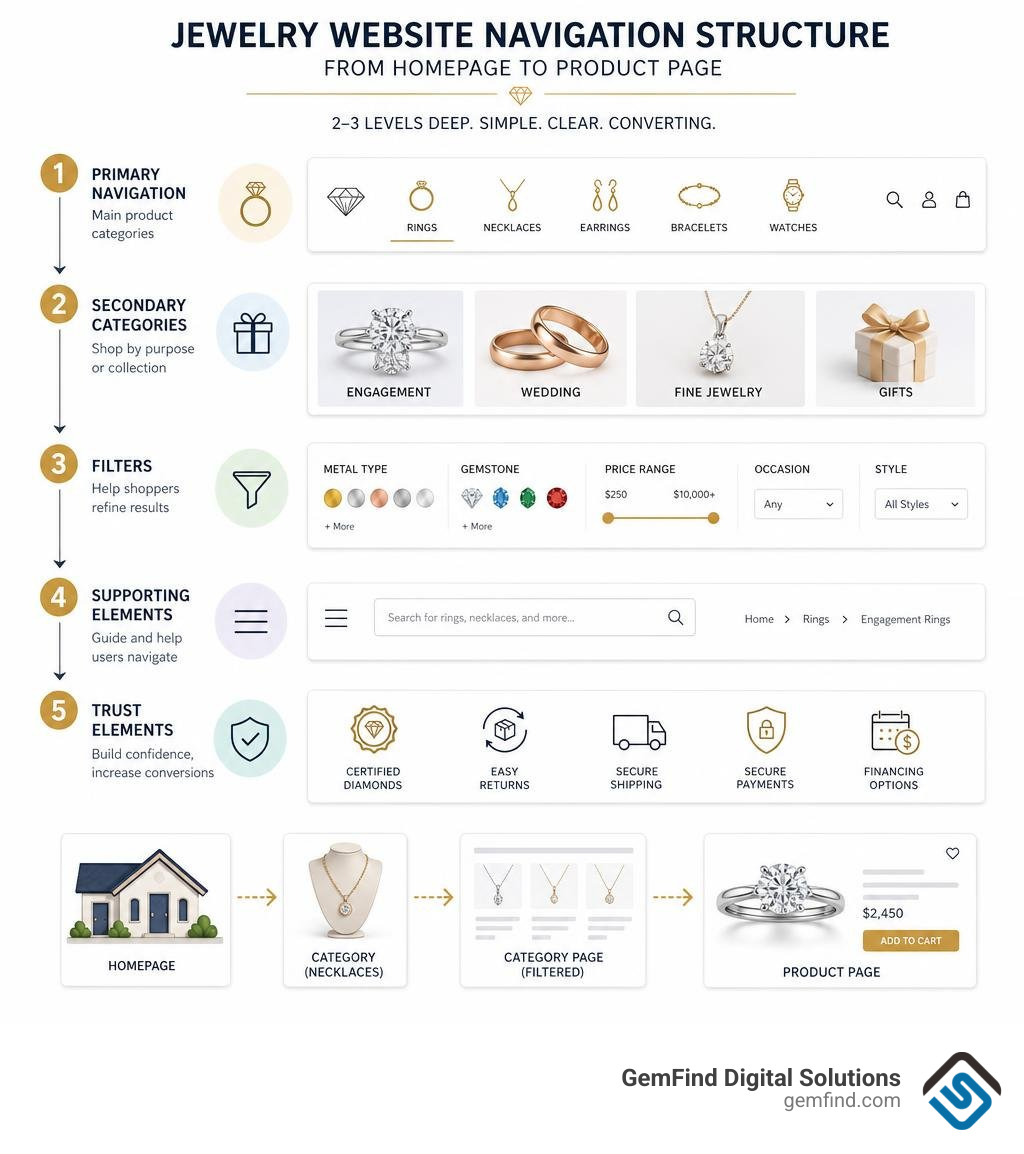
Optimal jewelry website navigation structure at a glance:
| Layer | What to Include |
|---|---|
| Primary navigation | Rings, Necklaces, Earrings, Bracelets, Watches |
| Secondary categories | Engagement, Wedding, Fine Jewelry, Gifts |
| Filters | Metal type, Gemstone, Price range, Occasion, Style |
| Supporting elements | Search bar, Breadcrumbs, Mobile hamburger menu |
| Trust elements | Certifications, Returns policy, Financing info |
Keep it to 2-3 levels deep. Never more.
Jewelry is not like buying a t-shirt. Shoppers research for weeks. They compare metals, gemstones, and settings. They come back multiple times before buying. A confusing menu kills that journey before it starts.
The stakes are high. Over 65% of jewelry browsing happens on mobile devices. Slow pages drive 40% higher bounce rates. And research from Baymard Institute shows that overcategorization — too many menus, too many labels — causes shoppers to abandon the site entirely, yet 75% of jewelry stores still make this mistake.
One real-world example tells the story well: a major jewelry retailer once had 9 top-level navigation categories and over 100 subcategories. The result? Frustrated shoppers skipped the menu altogether and went straight to search — or left entirely. After cutting the navigation down to just 5 clear categories, the shopping experience improved dramatically.
Your navigation is not just a menu. It's the path between a curious visitor and a confident buyer.
I'm Anthony Arechiga, VP of Sales at GemFind Digital Solutions, and with nearly two decades of experience helping jewelry retailers build high-performing websites, I've seen how a well-planned jewelry website navigation structure separates stores that convert from stores that frustrate — and in this guide, I'll walk you through exactly how to get it right.
Why a Specialized Jewelry Website Navigation Structure Matters
When someone visits an online clothing store, they usually have a pretty straightforward path: find shirts, select a size, pick a color, and buy. But jewelry is an entirely different beast. We are dealing with high-average-order-value items, emotional purchase journeys, and an overwhelming number of product attributes.
An effective jewelry website navigation structure acts as the invisible framework that guides search engines and human visitors alike. Without it, your premium products are buried under a cluttered digital catalog. As UX designer Min Bui highlights in his case study on transitioning from cluttered catalogs to premium discovery experiences, luxury shoppers require an editorial, highly organized flow to reduce purchase hesitation.
When your site’s information architecture is intuitive, it reduces the cognitive load on your visitors. They don’t have to guess where to find a 14k yellow gold diamond halo ring. If they get confused, they leave. By structuring your site around logical user behavior, you create a seamless path to checkout. To dive deeper into how this architecture impacts your bottom line, explore our Ultimate Jewelry Ecommerce Guide 2026.
Designing the Core Taxonomy: Categories and Subcategories
At its heart, website taxonomy is simply how you group and label your products. For a jewelry store, this means balancing parent categories (the big buckets) with child categories (the specific styles) without overwhelming the shopper.
We always recommend keeping your structure relatively flat. A flat structure means a visitor can get from the homepage to any product page in three clicks or less. When you over-categorize, search engines struggle to crawl your site, and your visitors get tired of clicking. For a step-by-step breakdown of building a scalable backend, take a look at our Jewelry Website Development Guide 2026.
Mapping the Jewelry Website Navigation Structure by Product Type
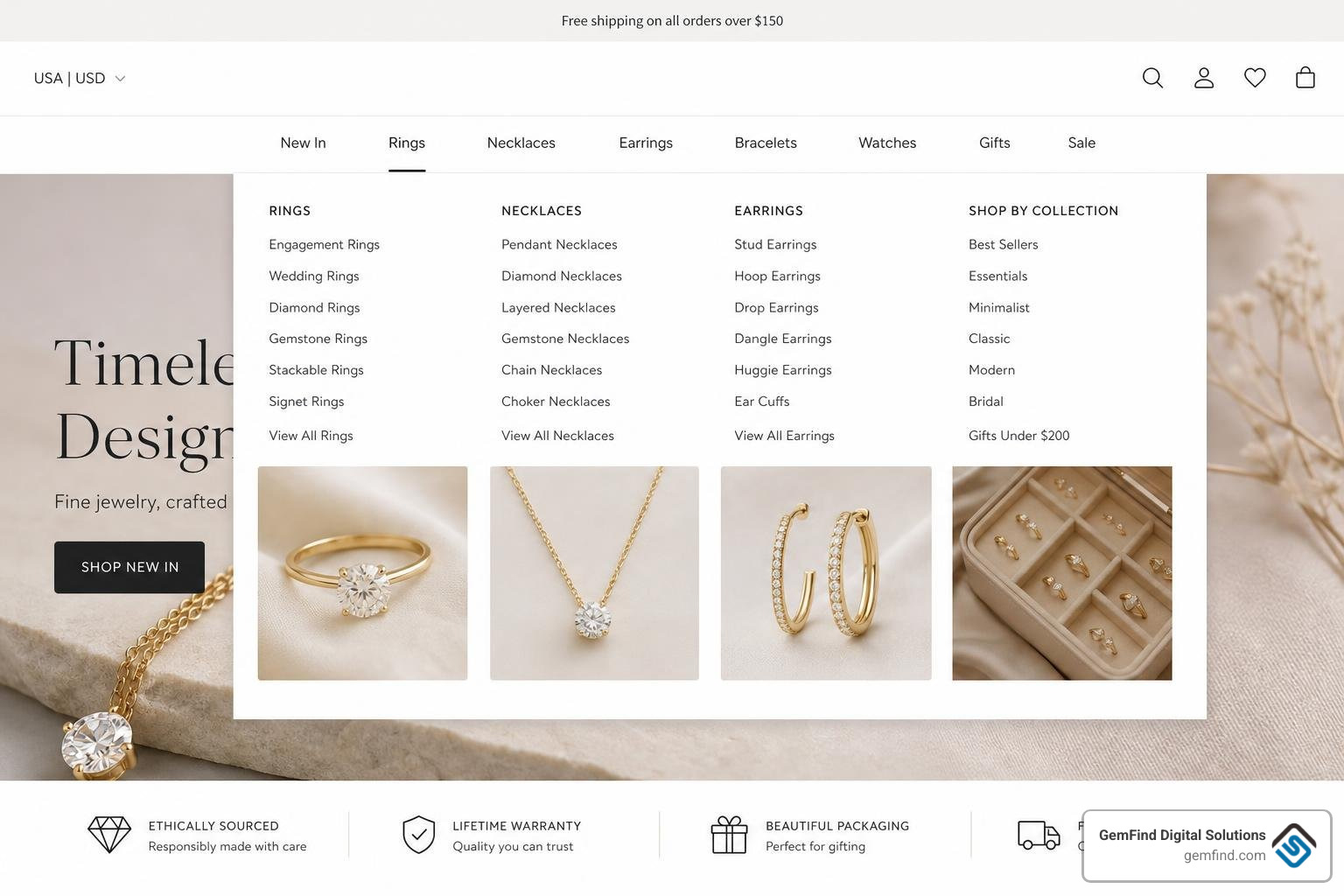
The most natural way human beings shop for jewelry is by product type. Your primary desktop navigation menu should feature these recognizable, high-level categories:
- Rings
- Necklaces
- Earrings
- Bracelets
- Watches
Avoid using overly creative or "flowery" names for these top-level links. While "Celestial Hand Adornments" might sound poetic in a branding meeting, your customers are searching for "Rings," and search engines are looking for that exact keyword too. Keeping labels simple and direct aligns perfectly with user search intent.
For visual inspiration on how premium brands lay out these categories elegantly, you can check out Diamond Buzz's analysis of jewelry website design.
Organizing Complex Collections and Custom Pieces
Once you have your core categories established, how do you handle specialized categories like bridal collections, vintage items, or custom jewelry?
The secret is to separate your permanent structural categories from temporary or marketing-driven collections.
- Bridal & Engagement: Because engagement rings and wedding bands represent highly emotional, high-ticket purchases, they deserve their own prominent space in your primary menu.
- Custom Jewelry: If you offer custom design services, this should be a clear, single-tier menu link that leads to an educational landing page or an interactive design tool.
- Vintage & Estate: Keep these separated from your modern fine jewelry to avoid confusing shoppers who are looking for specific eras or certified pre-owned items.
A famous industry case study from NYC experience designer Marina Krutchinsky's Helzberg navigation redesign proved that reducing a massive, 9-category menu down to a streamlined 5-category layout (Engagement, Wedding, Diamonds, Jewelry, and Gifts) dramatically simplified product discovery and boosted user engagement. To learn how to apply these clean layout design principles directly to your brand, read our Website Design for Jewelers Guide 2026.
Advanced Filtering and Faceted Search for Jewelry Catalogs

One of the most common mistakes we see jewelers make is trying to put every single product variation into the main navigation menu. If you have subcategories for "Yellow Gold Rings," "White Gold Rings," "Rose Gold Rings," and "Platinum Rings" all dangling from your main menu, you are cluttering your space.
Instead, use faceted filtering.
Faceted filters allow users to land on a broad category page (like "Necklaces") and then check boxes on the sidebar to narrow down their search by specific attributes. This keeps your main menu clean while giving shoppers ultimate control over their discovery process.
| Feature | Category-Based Navigation | Attribute-Based Filtering |
|---|---|---|
| What it is | Hard-coded parent/child menu links | Dynamic sidebar checkboxes |
| Best used for | Broad product types (Rings, Earrings) | Specific variations (Metal, Gemstone, Price) |
| SEO Impact | Creates indexable landing pages | Reduces duplicate content issues |
| User Experience | Helps users start their journey | Helps users pinpoint exact items |
By combining a clean main menu with robust sidebar filters, you give your customers the best of both worlds. For a complete checklist of filters that drive sales, check out our guide on Essential Website Features to Boost Your Jewelry Stores Conversions.
Handling Complex Product Variations in the Jewelry Website Navigation Structure
Jewelry products are highly customizable. A single ring style might be available in three different metal types (14k yellow gold, 18k white gold, platinum), five different center stone shapes, and ten different ring sizes.
If you create a separate search result or catalog listing for every single variation, your collection pages will look repetitive and messy.
The best practice is to display the parent product on your collection catalog page and handle the variations (like ring sizes and metal options) directly on the Product Detail Page (PDP) using clean dropdown menus or visual color swatches. This keeps your inventory organized, prevents duplicate content issues for SEO, and makes browsing a breeze. To see how to configure these variants on platforms like Shopify, check out our Jewelry Online Store Guide 2026.
Enhancing Trust and Reducing Friction in the High-Value Purchase Journey
Because fine jewelry is an expensive investment, online shoppers naturally experience higher purchase anxiety. Your website's navigation structure plays a massive role in building trust and reducing that friction.
If a customer cannot easily find your return policy, your physical store address, your warranty details, or your diamond grading certifications, they will hesitate to add an item to their cart. In fact, checkout complexity accounts for 18% of abandoned purchases, and general cart abandonment hovers around 70%.
To combat this, your navigation should always feature easy-to-find trust signals:
- Utility Navigation: Place links to your shipping policies, return policies, and financing options in a top utility bar or clearly organized in your footer.
- Education Hubs: Link your diamond education or gemstone guides directly from your main menu flyouts.
- Booking Links: For high-ticket bridal items, include a prominent "Book an Appointment" button in your header navigation.
By making these trust resources highly visible, you transition your site from a simple transaction portal to a premium discovery experience. Learn more about the trust-building tools you need in our article on 3 Features Your Jewelry Website Absolutely Must Have.
Breadcrumbs and Search Functionality for Long Research Cycles
Because jewelry buyers often take weeks to make a decision, they will visit your site multiple times, comparing different pieces. To make this research cycle as painless as possible, you need two critical navigation tools:
- Breadcrumb Trails: Breadcrumbs are the little text paths at the top of a product page (e.g., Home > Fine Jewelry > Earrings > Diamond Studs). They show the user exactly where they are in your site's hierarchy and allow them to jump back to a broader category with a single click. They also help search engines understand your site structure.
- Smart Autocomplete Search: A prominent search bar should live at the top of every page. A smart search bar should suggest popular products as the user types, handle common spelling mistakes, and display small product thumbnail images directly in the search dropdown.
As Web4Jewelers notes in their guide on jewelry e-commerce navigation, failing to include breadcrumbs and clear search paths is one of the quickest ways to lose a customer who is trying to find a piece they looked at yesterday. To turn your search and navigation paths into powerful lead-capture opportunities, read our guide on How to Turn Your Website into a Lead Generation Hub.
Mobile-First Navigation and Performance Optimization
With over 65% of jewelry browsing happening on mobile devices, your mobile menu cannot be an afterthought. If your desktop mega menu is beautiful but your mobile hamburger menu is a clunky, endless list of links, your conversion rates will suffer.
When designing for mobile:
- Keep it Thumb-Friendly: Ensure all menu buttons, category links, and filter checkboxes are large enough to be easily tapped with a thumb without accidentally clicking the wrong link.
- Limit the Taps: Don't make users tap through five different nested menus to find a product. Use collapsible accordion menus that expand in place.
- Optimize for Speed: High-resolution jewelry photography is beautiful, but if it slows down your site, your bounce rate will skyrocket. Slower sites experience up to a 40% higher bounce rate. Compress your images, use modern formats like WebP, and ensure your mobile menu loads instantly.
To make sure your mobile experience is fully optimized for modern shoppers, take a look at our practical Tips for Creating a Successful Ecommerce Jewelry Website.
Frequently Asked Questions about Jewelry Website Navigation
How should jewelry websites organize product categories?
Jewelry websites should organize categories using a simple, logical hierarchy based on product types (Rings, Necklaces, Earrings, Bracelets). Avoid using creative, confusing names. Keep the structure flat (2-3 levels deep) and use secondary filters for specific attributes like metal type, gemstone, and price rather than creating separate main menu categories for every variation.
What filtering options are essential for jewelry websites?
The most essential filters for a jewelry website are:
- Metal Type (e.g., 14k Yellow Gold, Platinum, Sterling Silver)
- Gemstone Type (e.g., Diamond, Sapphire, Emerald)
- Price Range (using clickable brackets or a slider)
- Style/Occasion (e.g., Solitaire, Halo, Vintage, Anniversary)
- Size (especially for rings)
How do mobile navigation requirements differ for jewelry websites?
Mobile navigation must accommodate smaller screens and touch interactions. This means replacing large desktop mega menus with clean, collapsible hamburger menus, using larger, thumb-friendly tap targets, and simplifying filter sidebars so they don't crowd the screen. Fast loading times are also critical on mobile to prevent high bounce rates.
Conclusion
Polishing your jewelry website navigation structure is one of the most effective ways to turn casual browsers into confident buyers. By simplifying your categories, implementing smart filtering, and designing with a mobile-first mindset, you create a premium shopping experience that honors the beauty and value of your jewelry.
At GemFind Digital Solutions, we have spent more than 25 years helping retail jewelers, manufacturers, and brands build stunning, highly search-optimized online stores. As a certified Shopify and Google Partner, we specialize in creating custom web designs, seamless Edge POS integrations, and specialized interactive tools (like our state-of-the-art ring builders) tailored specifically for the jewelry industry.
Ready to transform your online store into a conversion powerhouse? Request a consultation with us today and let's make your digital presence shine. For a complete roadmap to online success, explore our Complete Guide to Jewelry Online Stores.


