


Why the Meta Business Suite Ads Manager Connection Confuses So Many Business Owners

Understanding how Meta Business Suite and Ads Manager work together is the first step to running effective ads on Facebook and Instagram. Here's the quick answer:
| Tool | What It's For |
|---|---|
| Meta Business Suite | Organic content, scheduling posts, managing messages, and organizing your Meta assets |
| Meta Ads Manager | Creating, managing, and optimizing paid ad campaigns across Facebook, Instagram, Messenger, and WhatsApp |
The key difference: Business Suite is your management hub. Ads Manager is your advertising engine. You need both — but for different jobs.
Many jewelry store owners log into Facebook, see two different dashboards, and freeze. Which one do you use to run ads? Where do you schedule posts? Why do some buttons seem to do the same thing in both tools?
You're not alone. These two platforms look similar on the surface, but they serve very different purposes. Mixing them up wastes time — and can mean your ad campaigns never get the structure they need to perform.
This guide breaks down exactly how the two tools connect, what each one does, and how to use them together to grow your jewelry business online.
I'm Anthony Arechiga, VP of Sales at GemFind Digital Solutions, where I've spent nearly two decades helping jewelry retailers build stronger digital marketing strategies — including navigating the evolving Meta Business Suite and Ads Manager ecosystem. I'll walk you through everything you need to know so you can stop guessing and start advertising with confidence.
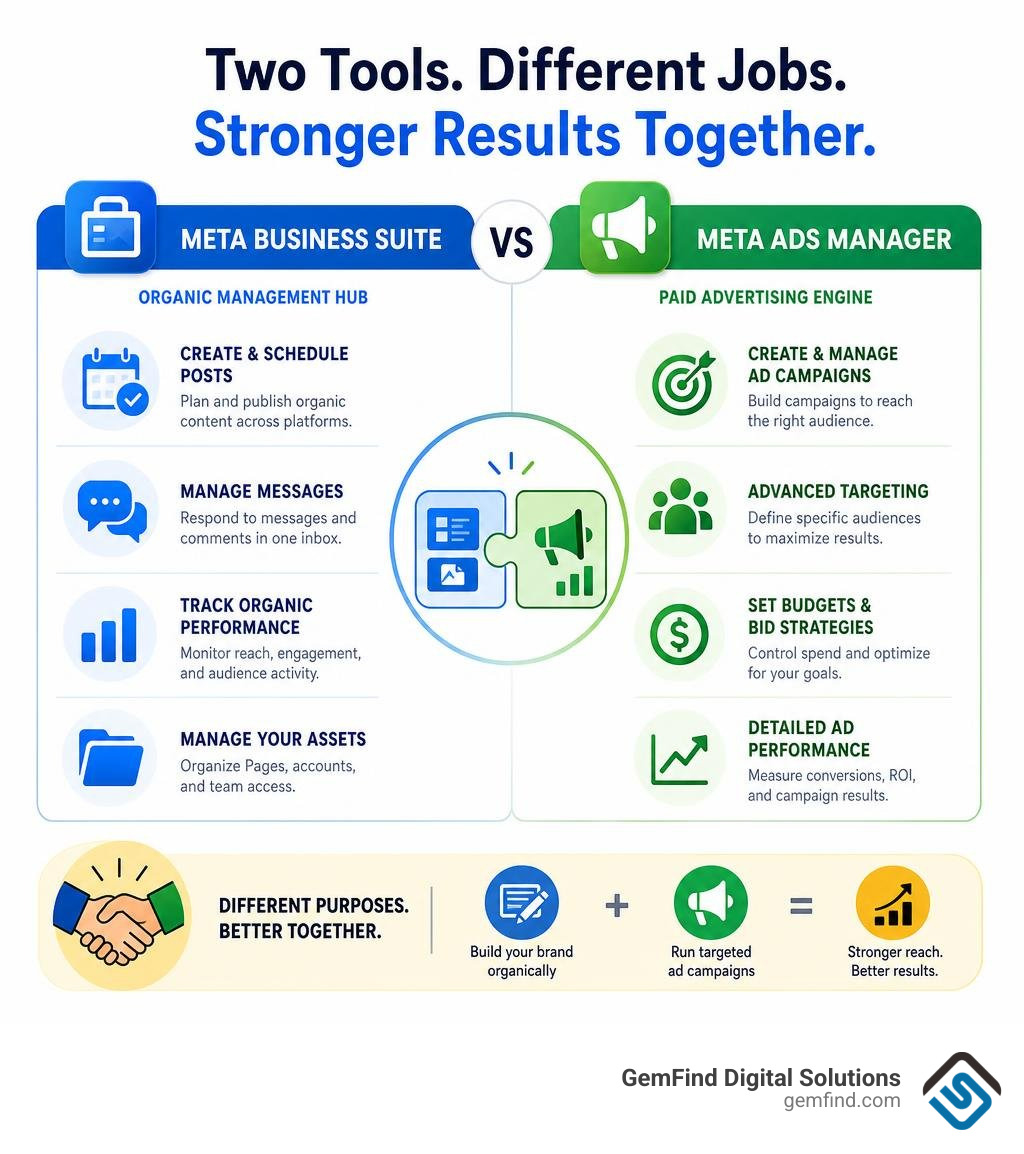
Know your meta business suite ads manager terms:
Navigating the Meta Business Suite Ads Manager Ecosystem
To understand how these platforms interact, it helps to look at the structural hierarchy of Meta's business tools. Think of Meta Business Suite as your storefront's main office, while Meta Ads Manager is the specialized marketing department down the hall.
When you log into your Facebook Page, you are looking at your public-facing social presence. To access the backend, you must switch your profile from your personal account to your Facebook Page. Once you make this switch, you will see the options to access Meta Business Suite and Ads Manager on the left-side navigation menu.
Meta Business Suite acts as an organizational layer that structures your entire Business Portfolio (which houses your Pages, Instagram accounts, WhatsApp lines, and catalogs). Ads Manager is nested inside this ecosystem. You can easily navigate to Ads Manager from the Business Suite dashboard by clicking on the "All Tools" menu on the left sidebar and selecting "Ads Manager."
Using these tools correctly is essential for maintaining control over your digital assets. For a deeper look at navigating this interface, check out How to Use Meta Ads Manager & Business Suite | Step-by-Step Guide [2026] or go directly to the official login portal via Meta for Business (formerly Facebook for Business).
Core Features of the Meta Business Suite Ads Manager Integration
Meta Business Suite is built primarily for page managers, brand coordinators, and organic social media strategists. It is designed to save you time by centralizing your daily operations across Facebook and Instagram.
Its core features include:
- Organic Content Scheduling: You can draft, schedule, and publish posts, Reels, and Stories to both Facebook and Instagram simultaneously. This ensures your jewelry store maintains a consistent posting schedule without requiring you to log into multiple apps daily.
- Unified Inbox: Instead of jumping between Facebook Messenger and Instagram DMs, the Business Suite provides a single inbox to manage all customer conversations. You can even set up automated instant replies to greet customers who message you after hours.
- Lead Management and Notifications: If you run organic lead-generation posts or have users interacting with your content, you can view your notifications and download collected leads directly from the Business Suite interface.
- Asset Connection: This is where you link your Facebook Page and Instagram professional account to ensure seamless cross-posting and data sharing.
By setting up these organic tools properly, you build a trustworthy brand presence. For example, learning How to Create a Call to Action Button on Your Facebook Page can turn casual organic visitors into active leads before you even spend a dollar on advertising. For more information on using these organic growth tools, visit Meta Business Suite | Ads Growth Tools.
Core Features of Meta Ads Manager
While the Business Suite keeps your daily operations running smoothly, Meta Ads Manager is where the real performance marketing happens. If you want to run highly structured, paid campaigns that target specific audiences and track precise return on ad spend (ROAS), Ads Manager is your non-negotiable tool.
Its key features include:
- Advanced Audience Targeting: Create Custom Audiences from your website traffic, customer lists, or offline POS data, and build Lookalike Audiences to find new shoppers who mirror your best customers.
- Pixel and Conversions API (CAPI) Integration: Track actions taken on your website—such as viewing a diamond ring, adding a necklace to a cart, or completing a purchase—to measure your exact ROI.
- Granular Budget Control: Set daily or lifetime budgets at either the campaign or ad set level, allowing you to control exactly how much you invest in prospecting versus retargeting.
- A/B Testing and Dynamic Creative: Test different combinations of headlines, images, and descriptions to let Meta's machine learning find the highest-performing combinations.
For an in-depth understanding of these features, read our Meta Ads Management Complete Guide or explore the key differences highlighted in Facebook Ads Manager vs Meta Business Suite 2026.
If you are just getting started, we highly recommend reading Facebook Ads 101 for Jewelers and our Facebook Ads Jewelry Complete Guide to align these technical tools with industry-specific strategies.
Managing User Access and Permissions in Business Portfolio
As your jewelry business grows, you will likely need to share access to your ad accounts with employees, external media buyers, or agency partners. Managing these permissions securely within your Business Portfolio (formerly Business Manager) is critical to protecting your financial and digital assets.

Meta uses a hierarchy of roles to ensure that users only have the level of access they need to perform their jobs (known as the principle of least privilege):
- Admin Access: Full control over the Business Portfolio. Admins can add or remove users, change billing information, and delete assets. This access should be restricted to business owners and highly trusted stakeholders.
- Advertiser Access: Allows the user to create, edit, and manage ad campaigns, view reports, and utilize audiences. Advertisers cannot manage billing, change account settings, or add other users.
- Analyst Access: View-only access. Analysts can pull reports and view campaign performance metrics but cannot make any active changes to campaigns or budgets.
When onboarding an external agency, it is structurally superior to use the "Partners" feature rather than adding agency staff as individual "Employees." This keeps your internal team separated from external contractors, ensures cleaner governance, and makes offboarding incredibly simple if you ever change partners.
For a step-by-step technical runbook on adding users and securing your account with two-factor authentication (2FA), refer to Meta Ads Add User Access | OpsBlu Docs. To see how this organizational structure applies specifically to retail jewelry stores, read A Guide to Organizing Facebook Ads for Jewelry Stores.
Campaign Structure and Advanced Features in Ads Manager
To get the most out of Meta Ads Manager, you must understand its three-tier campaign structure. Every ad campaign you run is organized into a nested system:
| Level | What You Configure Here | Key Decision |
|---|---|---|
| 1. Campaign | Overall advertising objective (e.g., Sales, Leads, Traffic) | What is my ultimate goal? |
| 2. Ad Set | Audience targeting, placements, budget, and scheduling | Who should see this, where, and when? |
| 3. Ad | Creative assets (images, videos, headlines, copy, destination links) | What will the customer see? |
By organizing your campaigns this way, you can test different audiences against each other within a single campaign, or test multiple creative variations within a single ad set. For example, you might create an ad set targeting a broad demographic and another utilizing How to Set Up Look Alike Audiences on Facebook for Your Jewelry Store.
Leveraging AI and Automation in 2026
Meta’s advertising platform relies heavily on artificial intelligence. Features like Advantage+ Shopping Campaigns (ASC) automate audience targeting and creative delivery by analyzing user behavior in real-time to find the people most likely to convert.
Additionally, you can protect your ad spend by setting up Automated Rules. For instance, you can write a rule that automatically pauses an ad set if the cost per purchase exceeds a specific dollar amount, or increases the budget by 10% if the Return on Ad Spend (ROAS) is performing exceptionally well. This automated safety net is one of the primary reasons Why Remarketing Ads on Facebook Work so well for luxury retailers.
Mobile vs. Desktop Campaign Management
The way you manage your campaigns often depends on whether you are at your desk or on the go. Both Meta Business Suite and Meta Ads Manager offer dedicated mobile applications.
The Meta Ads Manager mobile app is highly rated (4.5 out of 5 stars on the iOS App Store and 4.3 out of 5 stars with over 10 million downloads on Google Play). It is an excellent "pocket-sized toolkit" for monitoring performance in real-time, pausing underperforming ads, or receiving instant alerts about budget delivery. You can download it directly via the Meta Ads Manager App - App Store.
However, the mobile app is not a complete replacement for the desktop experience. Complex tasks—such as setting up detailed targeting, building custom audiences, configuring the Conversions API, or analyzing deep performance breakdowns—should always be executed on a desktop browser.
Troubleshooting and Best Practices for Advertisers
Even experienced marketers run into technical hurdles when using the meta business suite ads manager interface. Understanding how to navigate these issues will save you hours of frustration.
Troubleshooting Your Meta Business Suite Ads Manager Setup
One of the most common complaints from advertisers is seeing greyed-out options or being unable to find their ad account. If you experience this, walk through this quick checklist:
- Check Your Selected Account: Look at the top-left dropdown menu in Ads Manager. It is easy to accidentally select your personal ad account instead of your business ad account.
- Verify Your Permissions: Go to your Business Portfolio settings and ensure you have been assigned the "Admin" or "Advertiser" role for that specific ad account. If your permissions are set to "Analyst," your editing buttons will be greyed out.
- Check Your Payment Method: If your ad account has an outstanding balance or a failed payment, Meta will temporarily disable your ability to edit or launch campaigns until the billing issue is resolved.
Once your technical setup is running smoothly, you can focus on optimization. To maximize your budget, make sure you are targeting the right demographics by reading our guides on How to Target Jewelry Shoppers on Facebook and How to Target Jewelry Buyers on Facebook. Additionally, check out A Jeweler's Guide to Running Successful Facebook Ad Campaigns and keep in mind these critical Things to Consider When Advertising on Facebook and Instagram for Your Jewelry Store.
For advanced strategies on reaching high-intent luxury consumers, explore our guide on Effective Strategies to Target Jewelry Buyers on Facebook.
Frequently Asked Questions about Meta Business Tools
Can I run ads directly from Meta Business Suite without using Ads Manager?
Yes, you can "boost" posts or create simplified ad campaigns directly within Meta Business Suite. However, this is generally not recommended for performance-focused advertisers. Boosting posts provides very limited targeting, bidding, and placement options. To run structured campaigns with precise audience targeting and comprehensive tracking, you should always use Ads Manager.
What is the learning phase in Meta Ads and how long does it last?
The learning phase is the period when Meta’s algorithm gathers performance data to optimize your ad delivery. During this phase, your delivery status will show "Learning." To exit this phase, an ad set typically needs to generate about 50 conversion events (like purchases or leads) within a 7-day window. Avoid making significant edits (like changing budgets or creatives) during this time, as doing so will reset the learning phase.
Why are my campaign editing options greyed out in Ads Manager?
This usually happens for three reasons: you are logged into the wrong ad account, you lack the proper Admin or Advertiser permissions in your Business Portfolio, or your ad account has a billing issue that needs to be resolved. Double-check your user roles in Business Settings to ensure you have the correct access levels.
For a broader look at converting social media users into paying customers, check out our guide on How to Sell Jewelry to a Facebook User.
Conclusion
Navigating the connection between Meta Business Suite and Ads Manager can feel overwhelming, but mastering these tools is essential to scaling your jewelry store in today's digital landscape. By using the Business Suite to manage your organic presence and Ads Manager to power your paid campaigns, you create a cohesive marketing strategy that drives real business growth.
At GemFind Digital Solutions, we have over 25 years of industry-specific expertise helping jewelry brands succeed online. As a certified Shopify and Google Partner, we specialize in tailored solutions—including integrating your Edge POS system with your digital catalog to run seamless dynamic product ads.
Ready to elevate your digital marketing and take the guesswork out of social media advertising? Partner with GemFind for Meta Ads Management today, and let our team of experts build high-performing campaigns tailored specifically for your jewelry brand.


