


Why Your Shopify Checkout Page Could Be Costing You Sales

The best Shopify checkout examples share one thing in common: they remove every possible reason a customer might click away before buying.
Here is a quick look at the checkout features that move the needle most:
| Checkout Feature | Why It Matters |
|---|---|
| One-page / express checkout | Fewer steps = fewer drop-offs |
| Shop Pay / Apple Pay | Cuts form-filling; boosts conversion up to 50% |
| Trust badges & guarantees | Reduces abandonment caused by payment anxiety |
| Pre-purchase upsells | Increases average order value at the last moment |
| Guest checkout | Removes forced account creation (a top abandonment trigger) |
| Gift messaging & loyalty perks | Builds repeat business and emotional connection |
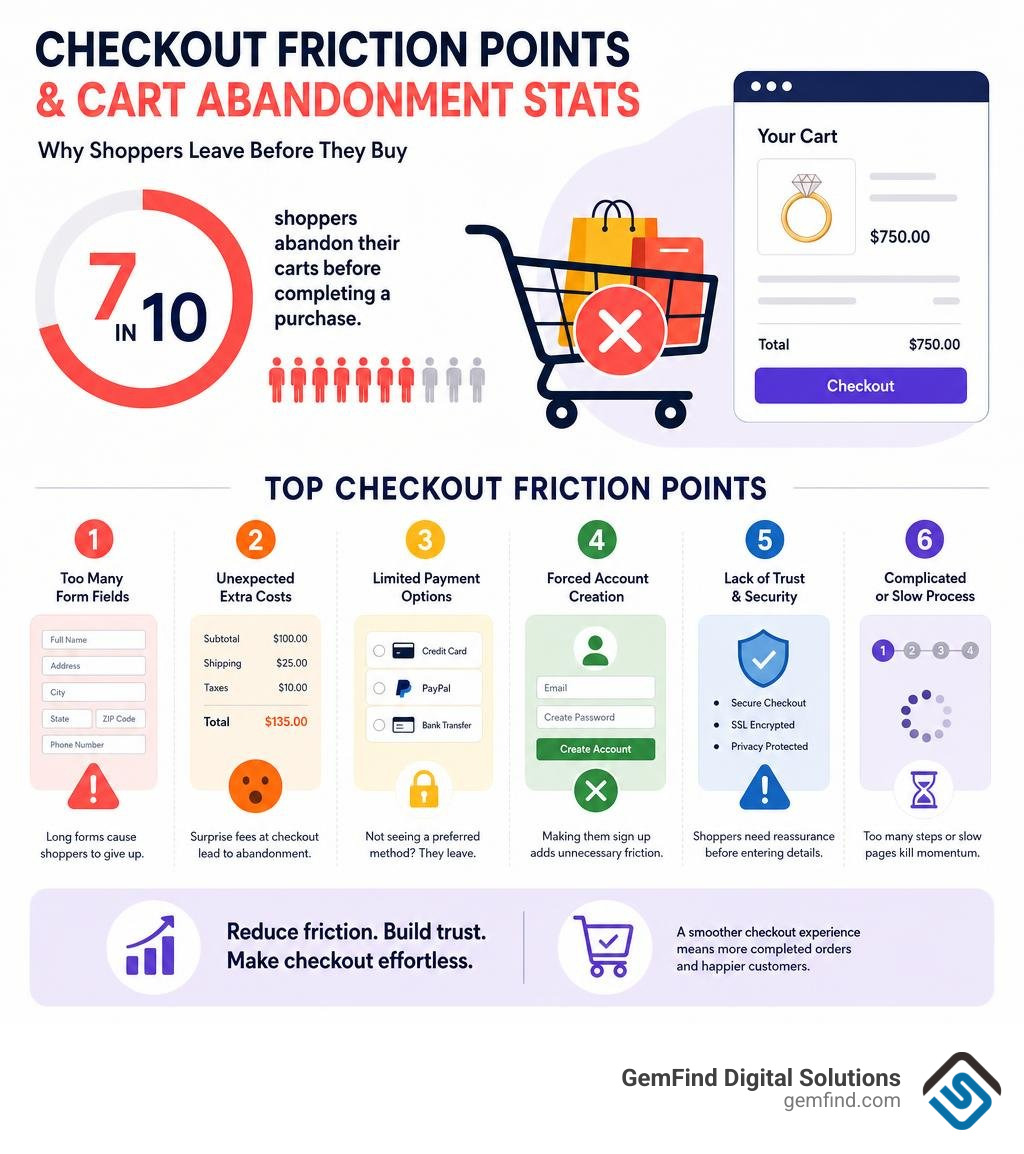
Nearly 7 in 10 shoppers abandon their carts before completing a purchase. For jewelry stores, where high price points already create hesitation, a clunky checkout can undo every dollar you spent on ads, photography, and SEO.
The problem is rarely the product. It is the friction — too many form fields, surprise shipping costs, no familiar payment options, and nothing to reassure a nervous buyer that their credit card is safe.
This article walks through real-world checkout designs that solve exactly those problems, so you can borrow what works and apply it to your own store.
I'm Anthony Arechiga, VP of Sales at GemFind Digital Solutions, where I've spent nearly two decades helping jewelry retailers build high-converting e-commerce experiences — including optimizing Shopify checkout examples for stores across the industry. In the sections below, I'll show you the specific design choices that separate a checkout that converts from one that quietly bleeds revenue.
Why Your Checkout Flow is the Ultimate Conversion Battleground
Your checkout page is where your hard work pays off. You have optimized your product descriptions, perfected your high-resolution photography, and ran highly targeted social media campaigns. But if your checkout page feels like a chore, your conversion rate will suffer.
According to research from the Baymard Institute, nearly 70% of potential customers choose to leave a site rather than complete their purchase. Even worse, 17% of online shoppers abandon their carts specifically because the checkout process is too long and convoluted, while 18% of US shoppers walk away simply because the process feels like "too much work."
When we look at how to combat this, the platform itself matters. Shopify’s overall conversion rate outperforms the competition by up to 36%—and on average by 15%. This inherent advantage gives Shopify merchants a massive head start. However, relying solely on default settings means leaving money on the table.
For luxury and jewelry retailers, checkout optimization is even more critical. High-ticket items naturally trigger buyer hesitation. If a customer is about to spend thousands on an engagement ring or a diamond necklace, any small friction point—like a missing security badge or a confusing shipping selector—will prompt them to close the tab. To see how these principles drive real-world results in the luxury space, check out our guide on How Shopify Can Convert More Sales for Jewelry Stores.
Below is a comparison of how a standard, unoptimized checkout compares to an optimized checkout experience:
| Checkout Element | Standard Checkout | Optimized Checkout |
|---|---|---|
| Layout | Multi-page, slow loading | Streamlined one-page checkout |
| Form Fields | 11+ fields (average) | 8 or fewer fields with address autofill |
| Account Creation | Forced registration (causes 25% abandonment) | Guest checkout enabled by default |
| Payment Options | Credit card only | Accelerated wallets (Shop Pay, Apple Pay, PayPal) |
| Trust Indicators | None or hidden in the footer | Prominent trust badges, guarantees, and support links |
| AOV Boosters | Static cart page | Dynamic, AI-powered pre-purchase upsells |
Real-World Shopify Checkout Examples to Inspire Your Store
When looking for design inspiration, it helps to study real-world shopify checkout examples from brands that have mastered the art of conversion rate optimization (CRO).
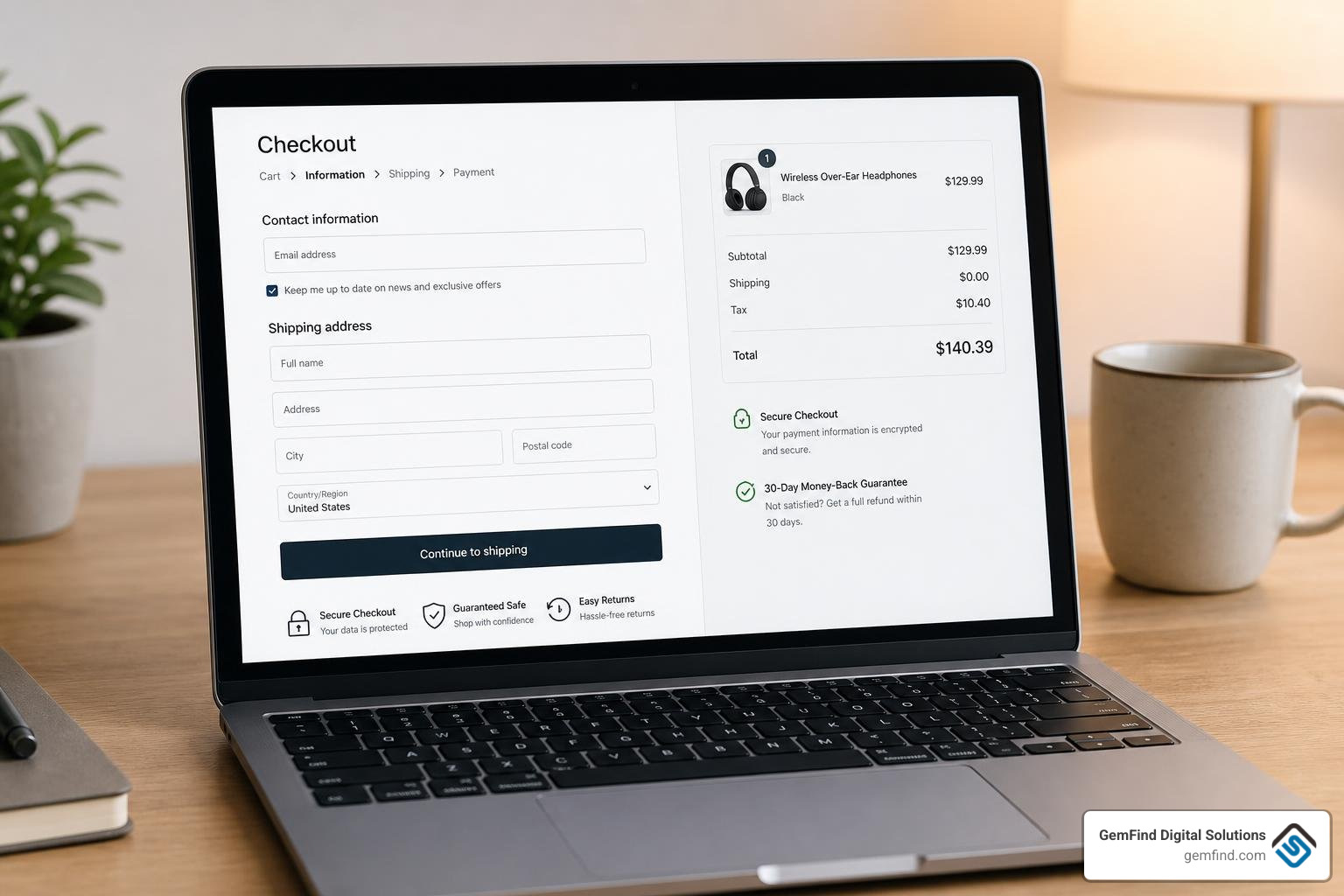
A high-converting checkout is not about flashy graphics; it is about visual hierarchy, clarity, and speed. The best checkouts guide the eye naturally from the contact information to shipping, and finally to payment, while keeping the order summary and trust signals visible at all times.
Let’s break down the four most effective checkout customization strategies used by top-tier DTC and luxury brands.
1. One-Page Checkout and Express Payments (Shop Pay, Apple Pay)
The fastest checkout is the one the customer barely has to fill out. Shopify’s modern one-page checkout is designed to fight "thumb typing" fatigue on mobile devices, which is where an estimated 70% of all e-commerce shopping occurs. Because typing on a phone is physically more tiring than using a keyboard, reducing form fields is paramount. An optimized flow should include up to eight fields, compared to the industry average of over 11.
Integrating express payment options is the ultimate shortcut. Shop Pay, Apple Pay, and PayPal allow customers to bypass form fields entirely by pulling saved shipping and billing details.
- The Conversion Lift: Shop Pay can boost conversion by as much as 50% compared to guest checkout, outperforming other accelerated checkouts by at least 10%.
- The Trust Factor: More than 150 million shoppers use Shop Pay when buying online. These buyers have a 9% higher repurchase rate than standard buyers.
- Flexible Financing: Offering Buy Now, Pay Later (BNPL) options like Shop Pay Installments makes high-ticket purchases more accessible, with brands seeing average order value (AOV) jump by as much as 50%.
For developers building custom headless storefronts or custom checkout flows, Shopify provides the tools to embed checkout experiences directly into web apps. You can learn more about embedding these seamless experiences by reviewing the documentation for Shopify’s web Checkout Kit.
2. Trust Signals and Guarantees in Shopify Checkout Examples
A lack of trust is to blame for almost a fifth of all cart abandonments. If a shopper feels even slightly insecure about inputting their credit card details, they will walk away.
To combat this, successful brands place trust signals strategically within the checkout UI. These include:
- Security Badges: SSL certificates, Norton Secured logos, and credit card processor icons.
- Risk-Reduction Guarantees: Bold callouts for "Free 30-Day Returns," "Lifetime Warranty," or "100% Satisfaction Guarantee."
- Direct Support Lines: Displaying a customer service phone number or a live chat widget directly in the checkout header. This is highly effective for custom or high-ticket items, as it gives nervous buyers an immediate way to resolve last-minute questions.
In the jewelry industry, establishing this trust is paramount. Shoppers need to know their high-value shipment is fully insured and authentic. For more on how to build a trustworthy checkout flow specifically for jewelry, read our deep dive on How Shopify's Checkout Process Can Produce More Online Sales for Jewelry Stores.
3. Pre-Purchase Upsells, Bundles, and Subscription Nudges
Your checkout page is a prime revenue-generating asset. Once a customer has decided to buy, you can strategically suggest highly relevant, low-friction add-ons to increase your average order value (AOV).
The key is to keep cross-sells subtle and relevant. For example, a jewelry brand might suggest a professional jewelry cleaning cloth, a premium gift box, or a shipping protection toggle.
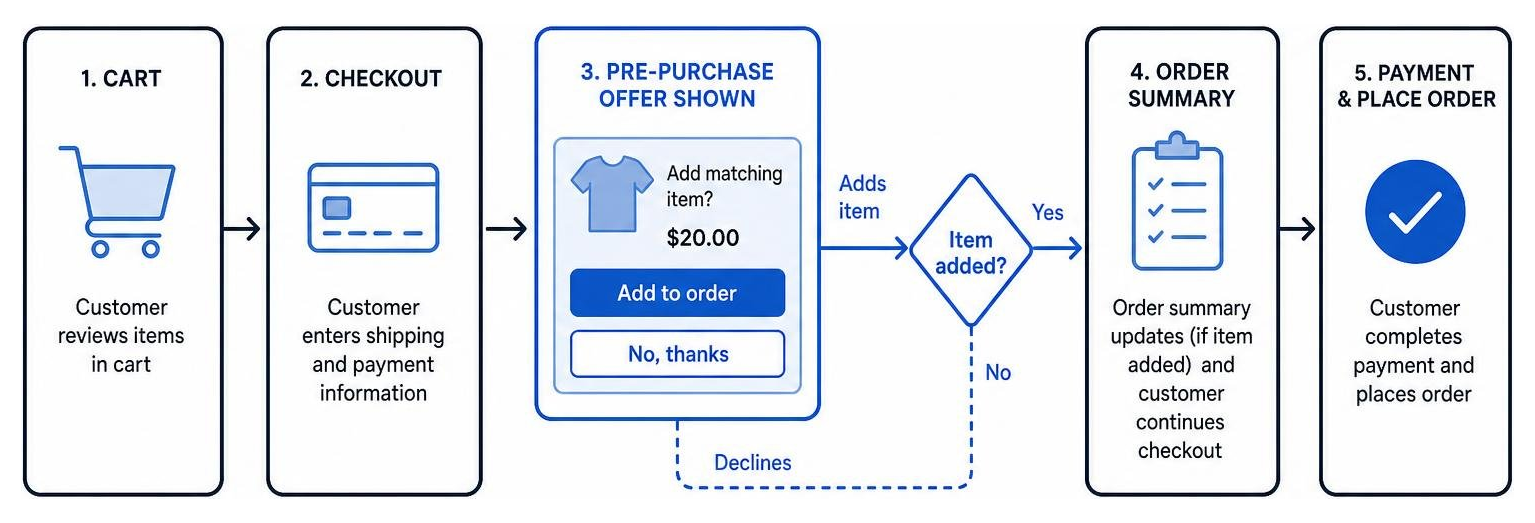
Shopify Plus merchants can build these custom product offers directly into the checkout layout. If you want to build this yourself, you can follow Shopify's developer guide to Build a pre-purchase product offer checkout UI extension. For a practical look at how this is coded using Vanilla JavaScript, you can check out the official Shopify/example-checkout--product-offer-pre-purchase--js repository.
4. Gift Messaging, Loyalty Programs, and Custom Fields
Personalization builds long-term customer loyalty. By allowing customers to customize their orders directly at checkout, you elevate the shopping experience.
- Gift Options: A simple "Is this a gift?" checkbox that reveals a text field for a custom gift message and an option for gift wrapping.
- Loyalty Points Integration: Allowing returning customers to redeem their loyalty points or rewards via a sliding scale directly on the checkout page.
- SMS Opt-In: A clean, non-intrusive checkbox to collect phone numbers for post-purchase shipping updates and marketing. Because text messages are opened eight times more than marketing emails, this is an incredibly valuable marketing asset.
When implementing these interactive elements, developers use native UI components like the Checkbox component within Shopify’s Checkout UI extensions to ensure a fast, accessible, and secure experience.
Standard Shopify vs. Shopify Plus Checkout Customization
While standard Shopify plans offer an incredibly fast and highly optimized checkout out of the box, enterprise-level merchants often require deeper customization to match their brand identity and business logic. This is where the distinction between standard Shopify and Shopify Plus becomes critical.
For years, Shopify Plus merchants customized their checkout pages using a template file called checkout.liquid. However, to improve security, page speed, and upgradeability, Shopify is deprecating checkout.liquid in favor of Checkout Extensibility. Standard Thank You and Order Status pages are fully transitioned to this new model.
Checkout Extensibility allows merchants to customize their checkout securely using Checkout UI extensions and Shopify Functions. These custom-built elements run in an isolated sandbox, meaning they won't break during platform updates and have a strict 64 KB size limit to keep page loads lightning-fast.
For scaling brands, upgrading to Shopify Plus unlocks the ability to run native A/B tests on checkout layouts (using Shopify's "Rollouts" feature) and build highly tailored B2B checkout experiences, such as displaying Net-30 payment terms or purchase order (PO) fields. To understand if an upgrade is right for your business, read our article on Why Jewelers Should Consider Switching to Shopify This Year.
Future-Proofing Your Store: 2026 Checkout Trends and AI Personalization
As we navigate July 2026, the e-commerce landscape is shifting rapidly toward automated, highly personalized shopping experiences. To remain competitive, merchants must look beyond static forms and prepare for the next generation of digital commerce.
AI-Powered Personalization
The modern checkout is dynamic. AI-powered personalization tools can analyze a shopper's behavior, cart contents, and referral source in real time to display the perfect checkout layout, localized currency, and customized upsell offers. Implementing AI-powered personalization at checkout can boost conversion rates by up to 35% and reduce checkout abandonment by almost 25%.
Agentic Commerce and AI Shopping
We are entering the era of agentic commerce, where consumers use personal AI assistants (like ChatGPT, Perplexity, or custom shopping agents) to research products, compare prices, and complete transactions on their behalf. In fact, 71% of US consumers already use AI tools, and 37% use them frequently.
To facilitate this, Shopify has introduced the Model Context Protocol (MCP) and Universal Commerce Protocol (UCP). These developer tools allow AI agents to programmatically build carts, apply discounts, and manage checkout sessions. Instead of a human filling out a form, an AI assistant can handle the entire process, redirecting the buyer to a secure storefront URL only for final payment verification or 3D-Secure challenges. Developers can explore this technology further via Shopify’s checkout agent integration documentation.
Frequently Asked Questions About Shopify Checkout Examples
How do I customize my checkout page using these Shopify checkout examples?
If you are on a standard Shopify plan, you can customize your checkout's basic appearance—such as adding your logo, changing background colors, and updating fonts—directly through the Shopify Theme Editor. For advanced customizations (like adding trust badges, upsells, or custom checkboxes), you can use third-party apps from the Shopify App Store. If you are on Shopify Plus, you can leverage Checkout Extensibility to build custom UI extensions or work with an agency to design a completely bespoke checkout flow.
What is the difference between one-page checkout and multi-step checkout?
A one-page checkout consolidates the customer's contact information, shipping details, and payment options into a single, streamlined view, minimizing page loads and steps. A multi-step checkout breaks the process into separate pages (usually Information, Shipping, and Payment). While one-page checkouts are generally superior for mobile conversion and speed, some high-ticket stores prefer multi-step layouts to guide customers deliberately through each phase of a high-value transaction.
How does Shopify Checkout handle inventory during the purchase process?
To prevent overselling, Shopify Checkout checks cart items against real-time inventory levels at every step of the process. However, inventory is only officially held when the customer submits their payment information, not when items are added to the cart. If a payment fails, the inventory hold is immediately released so other customers can purchase the item.
Conclusion
Optimizing your Shopify checkout is not a one-time task; it is an ongoing growth strategy. By implementing express payments, displaying clear trust signals, and utilizing subtle pre-purchase upsells, you can turn your checkout page from a conversion bottleneck into a powerful revenue engine.
At GemFind Digital Solutions, we combine over 25 years of jewelry industry expertise with our status as a certified Shopify and Google Partner to build e-commerce experiences that convert. Whether you need a custom-tailored Shopify theme, seamless Edge POS integration, or advanced Shopify Plus Checkout Customization, we are here to help your store thrive online.
Ready to stop losing sales at the finish line? Contact GemFind Digital Solutions today to schedule a consultation with our e-commerce design experts.


