


Grow Jewelry Sales With Meta Ads Manager for Instagram

Meta Ads Manager for Instagram gives you the control to turn attention into measurable business results. Set up a professional Instagram account, connect it to your Meta ad account, choose a goal such as website sales or leads, select Instagram placements, define your audience and budget, then track results like cost per purchase and return on ad spend.
For a jewelry store, that means you can show a new bridal collection to nearby shoppers, retarget people who viewed product pages, or turn a strong Reel into an ad without relying on guesswork. Meta Ads Manager is the deeper campaign tool; it offers more targeting, placement, testing, budget, and reporting control than a simple in-app boost.
This guide breaks down the practical decisions that matter: which Instagram formats to use, when to use campaign versus ad set budgets, how Advantage+ automation works, and how to spot billing, approval, or delivery issues before they waste spend.
I am Anthony Arechiga, Vice President of Sales at GemFind Digital Solutions, where I have helped drive digital growth for jewelry businesses since 2007. My experience with Meta Ads Manager Instagram strategies and jewelry e-commerce helps connect ad decisions to the outcomes that matter most: more qualified shoppers and online sales.
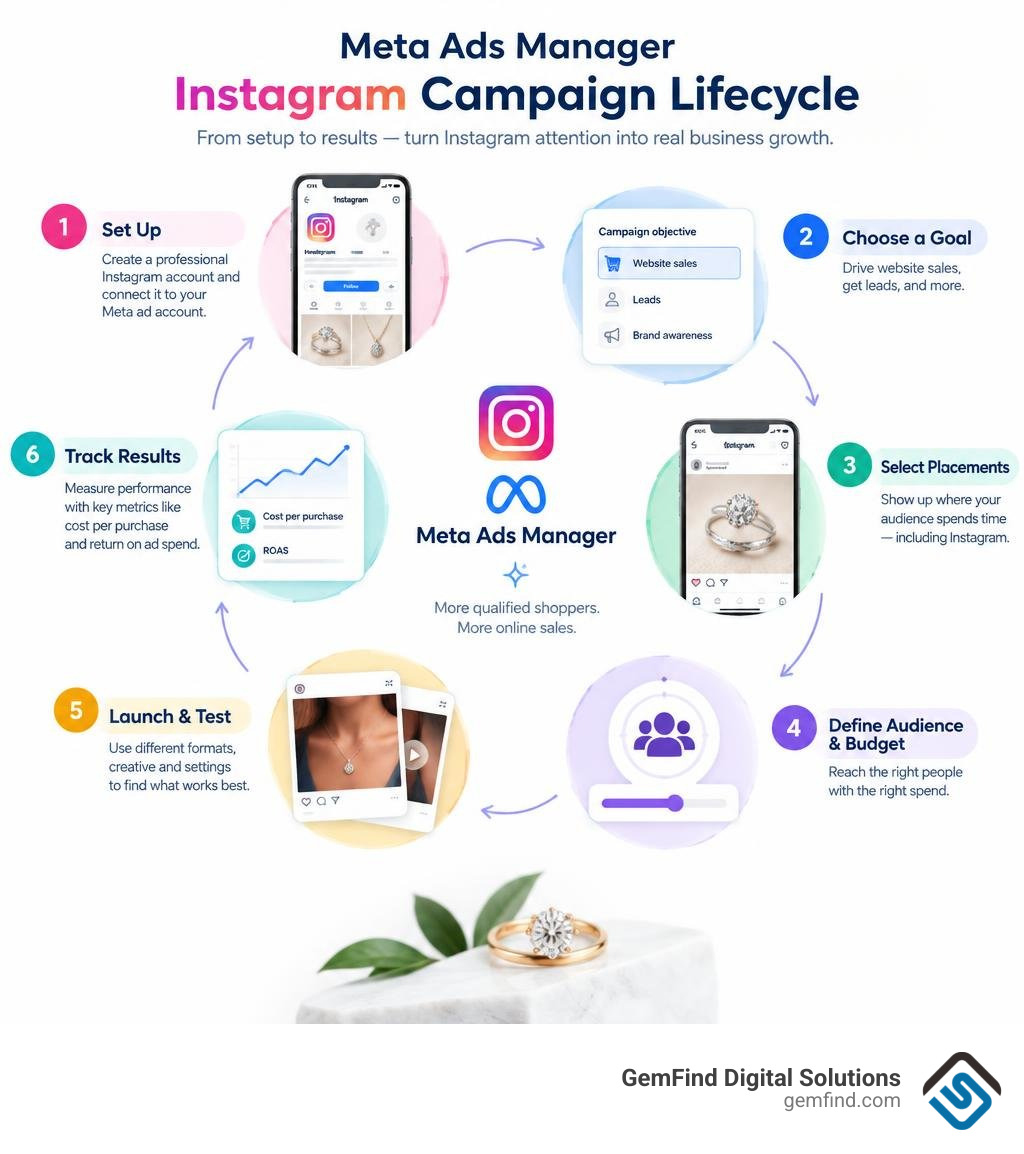
Simple meta ads manager instagram word guide:
- meta ads management
- meta business ad manager
- meta business suite ads manager
Meta Ads Manager vs. Meta Business Suite: Choosing the Right Tool for Instagram
Navigating the Meta advertising ecosystem often feels overwhelming when you are trying to decide where to spend your marketing budget. Business owners frequently ask us whether they should build campaigns in Meta Business Suite or dive into Meta Ads Manager. While both interfaces access the same underlying delivery network, they serve completely different operational functions.
Meta Business Suite is designed as an everyday operations hub. It centralizes social publishing, post scheduling across Facebook and Instagram, inbox messaging, and high-level page analytics. It also includes an interface to boost posts quickly. However, boosting through Business Suite restricts your targeting granularity, limits conversion tracking setups, and prevents sophisticated A/B creative testing.
In contrast, Meta Ads Manager is the enterprise-grade engine built specifically for paid social performance. It provides complete control over the full campaign hierarchy, granular placement selection (such as isolating Instagram Reels or Explore Home), deep pixel and Conversions API optimization, custom conversion events, and automated delivery rules. Understanding the breadth of Meta for Business solutions allows brands to separate daily organic community management from scalable customer acquisition.
| Feature / Capability | Meta Business Suite | Meta Ads Manager |
|---|---|---|
| Primary Purpose | Content scheduling, social inbox, organic management | Paid campaign creation, targeting, scaling, performance measurement |
| Targeting Control | Broad interest targeting and basic geographic radii | Custom Audiences, Lookalikes, granular demographics, Advantage+ targeting |
| Placement Customization | Automatic or simplified platform toggles | Granular control over Reels, Stories, Feed, Explore, Search, and Messenger |
| Budgeting Strategies | Basic daily or lifetime budget per boosted post | Campaign Budget Optimization (CBO), Ad Set Budgets (ABO), bid caps, cost per result goals |
| Creative Testing | Single creative per boosted post | Dynamic Creative testing, multi-asset combinations, Advantage+ catalog formats |
| Reporting Depth | Basic organic engagement, reach, top-line spend | Custom conversion attribution, ROAS, CPA, granular breakdown analysis |
For any brand looking to drive sustained online revenue or capture qualified local leads, Ads Manager is the non-negotiable command center.
Setting Up Meta Ads Manager Instagram via Business Manager
To run professional ad campaigns on Instagram, you must properly link your assets inside Business Manager. Running promotions purely through the native mobile app without an ad account creates fragmented data and limits access to custom audiences.
Follow this sequence to ensure your Instagram professional profile is correctly integrated into your Meta ad infrastructure:
- Convert to a Professional Account: In the Instagram mobile app, navigate to Settings and privacy > Account type and tools > Switch to professional account, and select either Business or Creator.
- Access Meta Business Settings: Open Meta Business Manager on a desktop browser and navigate to Business Settings > Accounts > Instagram Accounts.
- Claim the Instagram Account: Click Add, enter your Instagram credentials, and verify two-factor authentication to bind the profile to your business entity.
- Assign Ad Accounts: Under the claimed Instagram account in Business Settings, click Connected Assets > Add Assets, and link your active Meta Ad Account.
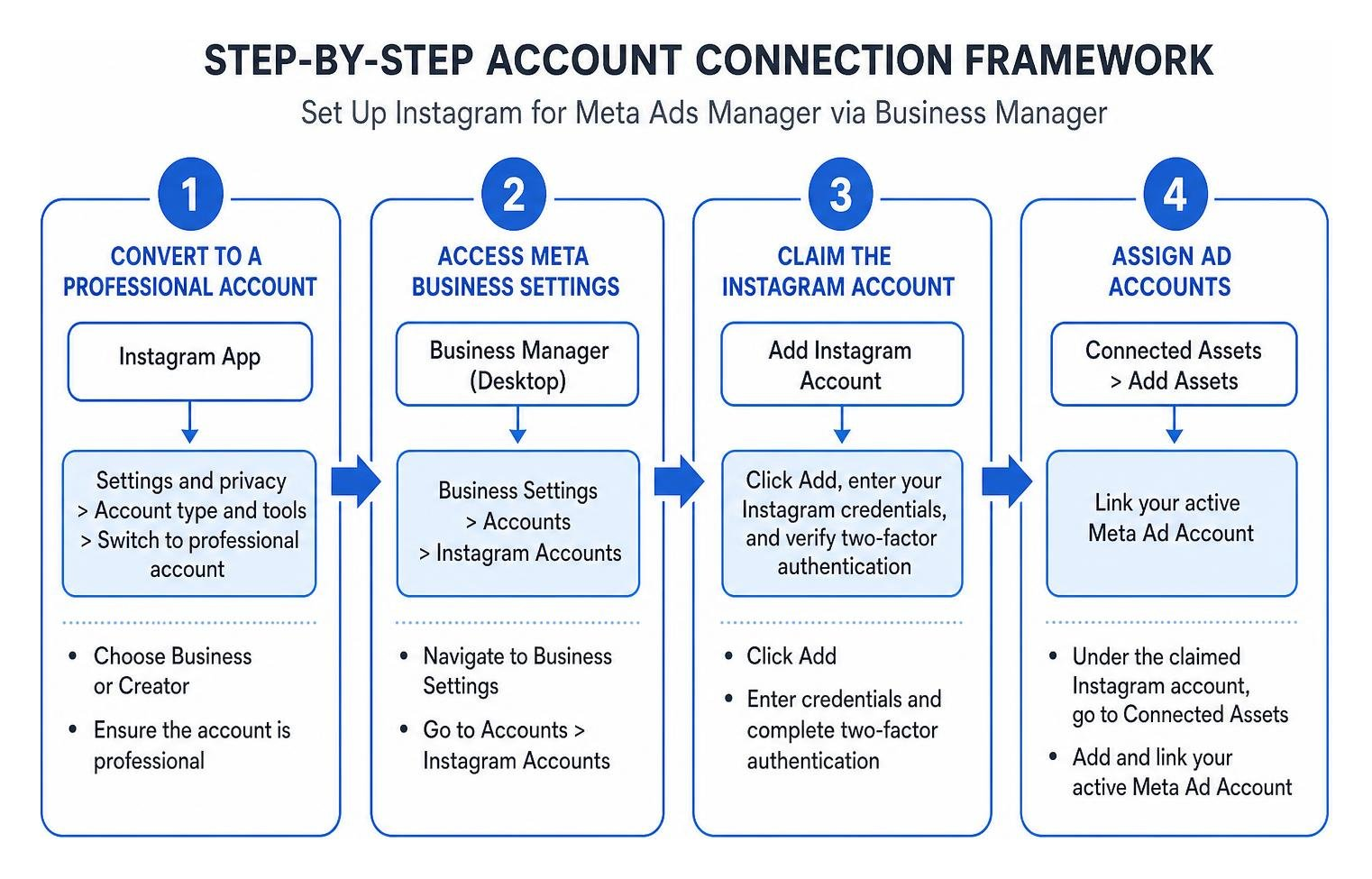
Following the developer instructions to set up Instagram accounts in Business Manager ensures your permissions and backend user IDs align. Connecting your accounts correctly also prevents severe financial pitfalls. In accordance with the official guide on Meta ad account options, Apple applies a 30% service fee on iOS transactions when you add prepaid funds or boost posts directly through the Instagram iOS app. Managing campaigns and billing through Ads Manager on desktop or Android circumvents this fee entirely, protecting your operational margins.
Mastering Meta Ads Manager Instagram: Core Architecture and Hierarchy
Meta Ads Manager operates on a strict three-tier architecture: Campaign, Ad Set, and Ad. Each layer governs specific operational parameters. Structuring your account methodically prevents internal auction overlap and ensures every dollar supports your primary commercial objective.
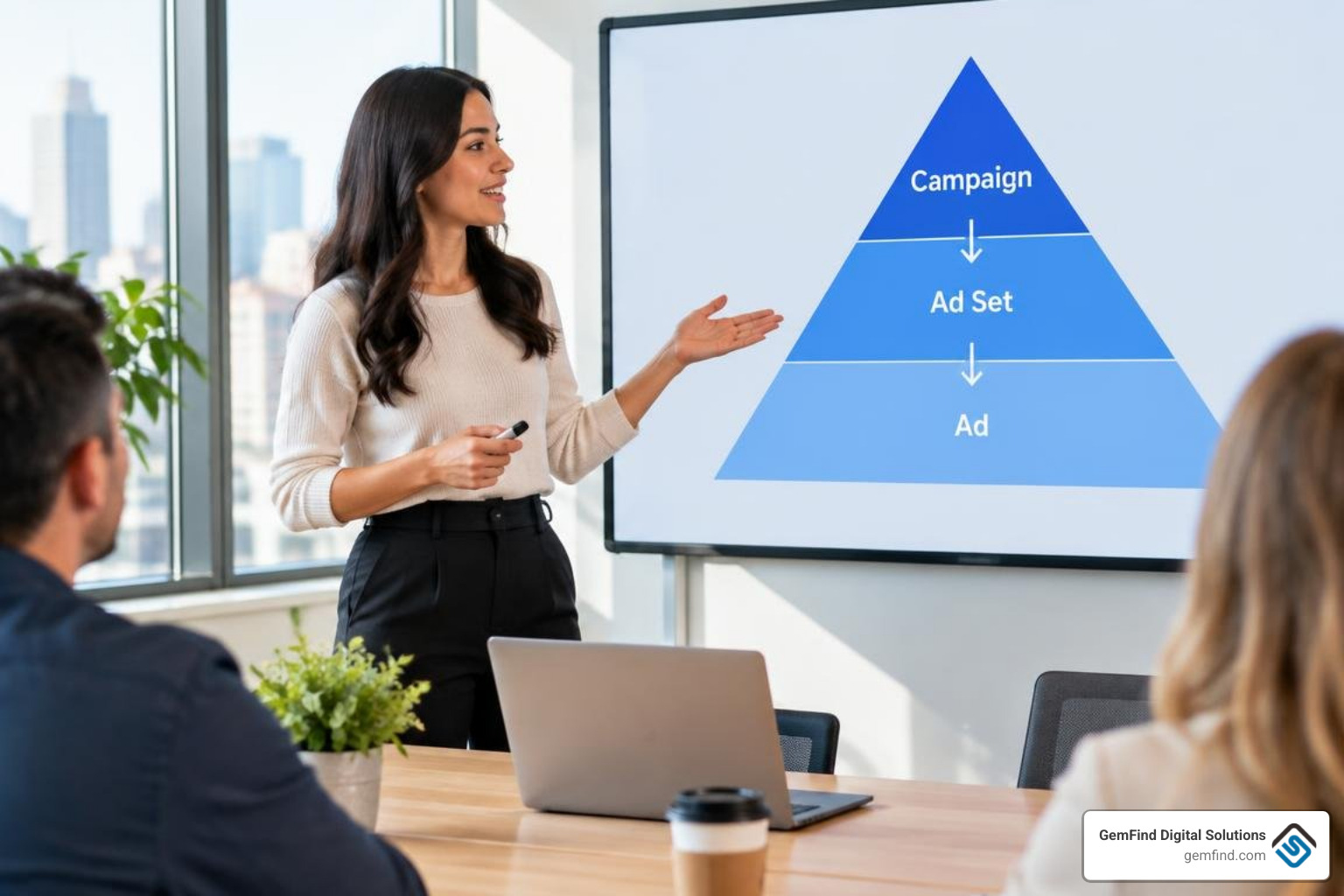
Campaign Level: Objectives and Budget Allocation
The Campaign level establishes the fundamental business goal. Meta uses advanced machine learning models to identify users within your target audience who are most likely to take your chosen action.
When configuring an Instagram campaign, Ads Manager offers consolidated objectives:
- Sales (Conversions & Catalog Sales): Ideal for e-commerce stores wanting purchases, dynamic product retargeting, or catalog integration.
- Leads: Optimized for instant forms, Instagram Direct message inquiries, or landing page submissions (e.g., custom jewelry design consultations).
- Traffic: Focused on maximizing link clicks and landing page views at the lowest cost per click.
- Engagement: Structured to increase video views on Reels, generate post comments, or drive direct message conversations.
- Awareness & Reach: Designed to maximize impressions among unique users across your designated geographic area.
Scaling Budgets in Meta Ads Manager Instagram: CBO vs. ABO
At the campaign and ad set levels, choosing the right budget model dictates how the delivery algorithm distributes capital:
- Advantage Campaign Budget (CBO): You set a single overarching budget at the Campaign level. Meta dynamically shifts spend in real time to the best-performing ad sets. CBO is best suited for scaling proven audiences and evergreen creative funnels.
- Ad Set Budget Optimization (ABO): You assign dedicated budgets to individual ad sets. ABO provides strict spend control, making it the ideal choice for audience testing, localized targeting with set quotas, or controlled A/B testing.
You must also choose between Daily Budgets (where Meta aims to average a specific spend per 24-hour cycle) and Lifetime Budgets (where spend is distributed across a set calendar window). Lifetime budgets unlock ad scheduling (dayparting), allowing you to run ads only during store hours or peak buying windows.
Ad Set and Ad Levels: Placements and Creative Execution
The Ad Set level defines audience parameters (demographics, custom audiences from website traffic, lookalikes), scheduling, and placement distribution. Meta allows you to run across all platforms or manually select specific Instagram surfaces:
- Instagram Feed: High-intent, traditional browsing feed supporting square (1:1) and vertical (4:5) static imagery and carousels.
- Instagram Stories: Full-screen vertical format (9:16) ideal for time-sensitive offers, polls, and interactive video.
- Instagram Reels: Fast-paced 9:16 vertical video driving high engagement and discovery through algorithmic sound and movement.
- Instagram Explore & Explore Home: High-discovery environments where users browse content aligned with their niche interests.
- Instagram Search Results: Contextual ad placements triggered when users actively search for relevant keywords or industry trends.
At the Ad level, you execute creative assets. You can construct net-new dark ads (which do not appear on your organic profile grid) using single images, videos, dynamic carousels, or collections. Alternatively, you can follow the official documentation for promoting existing posts documentation to amplify top-performing organic feed posts or Reels while preserving all accumulated social proof, comments, and likes.
Leveraging Advantage+ AI and Dynamic Creative Enhancements
Meta has integrated advanced artificial intelligence throughout its delivery engine to streamline campaign optimization and maximize return on ad spend.
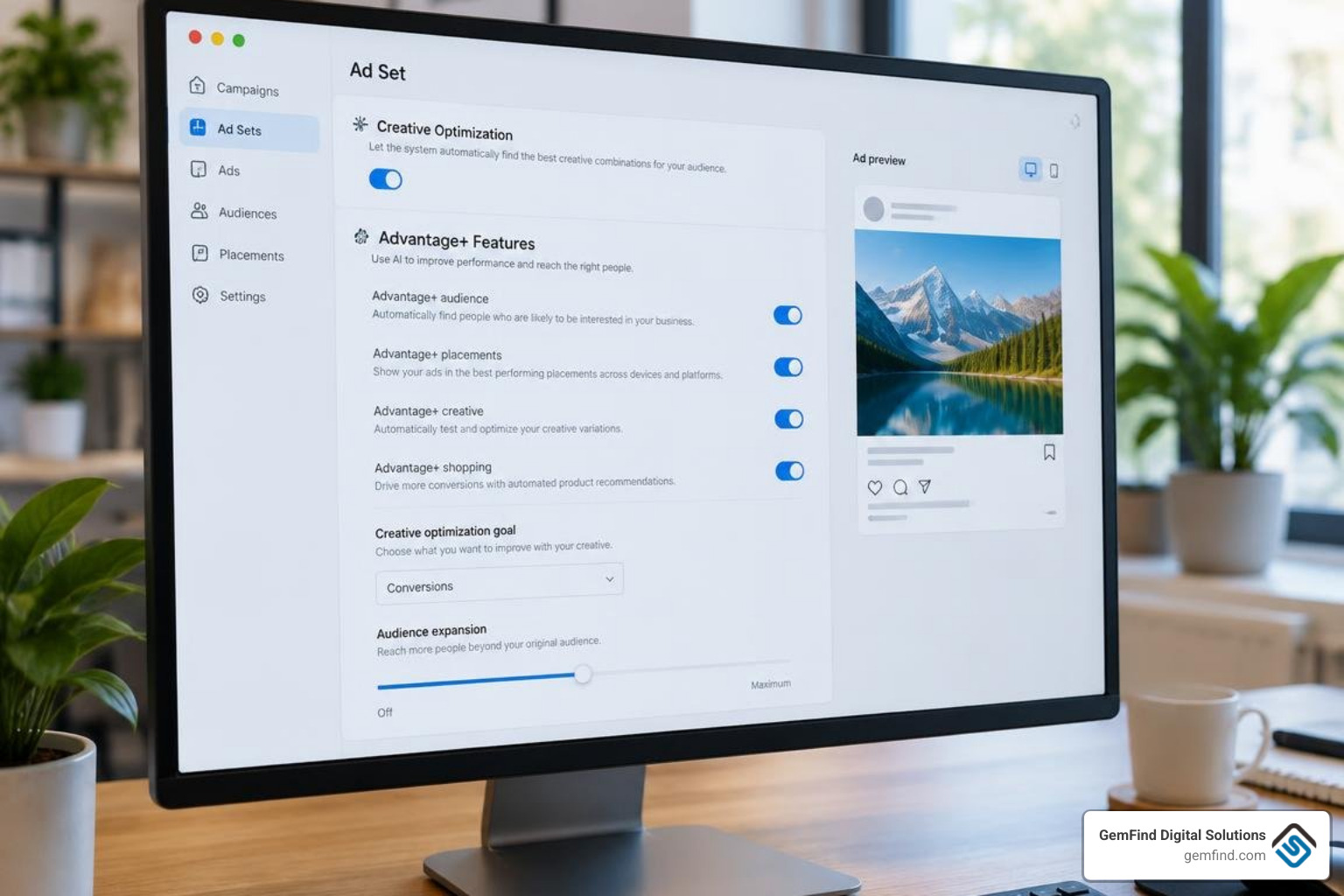
- Advantage+ Placements: Automatically delivers ads across Facebook, Instagram, Messenger, and Audience Network, allocating impressions to whichever placement delivers the lowest cost per result.
- Advantage+ Audience: Replaces rigid audience constraints with an AI-driven broad model. You provide demographic "audience suggestions," and Meta’s machine learning expands beyond those boundaries if higher-converting prospects are detected.
- Advantage+ Creative: Dynamically applies standard image enhancements, adjusts aspect ratios, generates background variations, or optimizes text placements based on an individual user's browsing tendencies.
- Opportunity Score: A real-time metric (graded from 0 to 100) inside Ads Manager that analyzes your account setup against Meta’s algorithmic best practices, offering one-click recommendations to improve delivery efficiency.
Integrating Royalty-Free Music in Instagram Ads
Audio is essential for vertical formats like Stories and Reels. When static image ads appear in video-dominated feeds without audio, conversion rates often drop. Ads Manager provides native access to the Meta Sound Collection, allowing advertisers to enrich static single-image creatives with licensed music.
To incorporate background tracks properly, review the instructions on how to add music in Ads Manager. In the Ad creative setup, check the Add music box. You can allow Meta to automatically select suitable tracks based on user preferences or manually curate up to 5 royalty-free tracks from the catalog, allowing the algorithm to dynamically serve the best-performing selection.
Important limitation: Royalty-free audio addition via Ads Manager is supported for single-image ads across Feed, Stories, and Reels. It cannot be applied to existing organic posts, multi-image carousels, or assets built inside Meta Creative Hub.
Performance Tracking, Metrics, and Troubleshooting Workflows
Accurate data analysis separates profitable paid campaigns from wasted spend. Default reporting views in Ads Manager display generic vanity metrics; configuring customized reporting columns is essential to track real business performance.
Key performance indicators to configure in your custom reporting view include:
- Return on Ad Spend (ROAS): Measures the revenue generated for every dollar spent on ads.
- Cost Per Acquisition / Cost Per Result (CPA): The exact cost incurred to generate a purchase, lead, or form submission.
- Click-Through Rate (CTR - Link Click): The percentage of impressions that resulted in a visit to your destination URL.
- Cost Per Mille (CPM): The cost to deliver 1,000 ad impressions, indicating audience competitiveness and creative relevance.
- Conversion Rate (CVR): The percentage of landing page visitors who completed the target transaction.
Use the Breakdown menu to analyze performance by Placement, Age & Gender, and Impression Device to isolate whether your spend is driving results on Instagram Reels versus Instagram Feed.
Troubleshooting Disapprovals, Account Restrictions, and Billing Issues
Even experienced advertisers encounter operational friction. Having a structured troubleshooting protocol protects your campaigns from downtime.
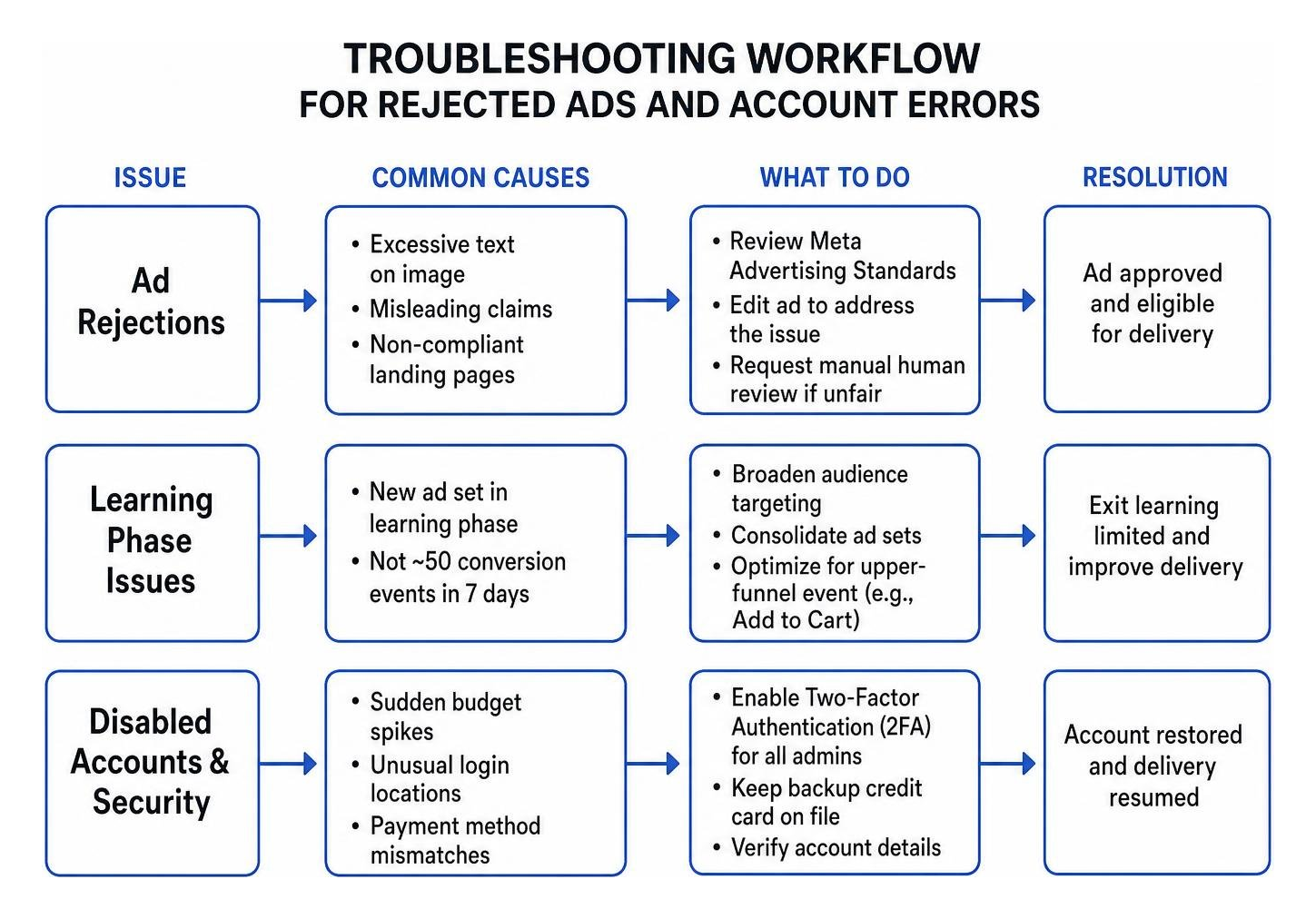
- Ad Rejections: Ads are automatically scanned by AI systems against Meta Advertising Standards. Common triggers include excessive text on promotional imagery, misleading claims, or non-compliant landing pages. If rejected unfairly, request a manual human review via the Account Quality dashboard.
- Learning Phase Issues: New ad sets enter a "Learning Phase" until they achieve approximately 50 conversion events within a 7-day window. If your ad set displays Learning Limited, broaden your audience targeting, consolidate ad sets, or optimize for an upper-funnel event (such as Add to Cart instead of Purchase).
- Disabled Ad Accounts & Security: Account flags often trigger from sudden budget spikes, logging in from unusual geographic locations, or payment method mismatches. Always enforce Two-Factor Authentication (2FA) across all Business Manager admins and maintain a secondary backup credit card on file to prevent delivery stoppages.
Frequently Asked Questions About Meta Ads Manager Instagram
Why are my Instagram ads not delivering after being published?
Ad delivery delays typically stem from a pending policy review, restrictive bid caps, narrow audience sizes, or conflicting account spending limits. Ensure your billing threshold has not been exceeded and that your budget is high enough to generate bids within your target market auction.
How do I avoid the 30% Apple service fee on Instagram boosts?
Avoid purchasing ad boosts or funding ad accounts directly inside the native Instagram iOS app. Instead, set up and fund all campaigns using Meta Ads Manager on a desktop web browser. This ensures 100% of your advertising budget goes directly toward ad delivery without Apple's mobile transaction surcharge.
Can I add background music to an existing Instagram post used as an ad?
No. Adding licensed tracks from the Meta Sound Collection via Ads Manager is strictly limited to newly created single-image ads. If you boost an existing organic post, it retains only the original audio or music licensed during organic creation.
Conclusion
Mastering Meta Ads Manager transforms Instagram from an organic showcase into a scalable, revenue-generating acquisition channel. By structuring campaigns methodically, leveraging Advantage+ automation, monitoring the right commercial metrics, and avoiding mobile billing surcharges, your brand can achieve sustainable, profitable growth.
Scaling paid social campaigns while managing product inventory, customer inquiries, and daily retail operations requires deep technical focus and constant testing. If you want to accelerate your digital growth, partner with GemFind Digital Solutions. With over 25 years of dedicated jewelry industry expertise, we specialize in high-converting web design, seamless POS and Shopify integrations, and expert meta ads management tailored to elevate your brand. Contact our team today to build a high-performance paid advertising strategy.


