


Why Great Jewelry Photos Make or Break Your Online Sales

Jewelry product photography tips can be the difference between a shopper clicking "add to cart" and clicking away forever.
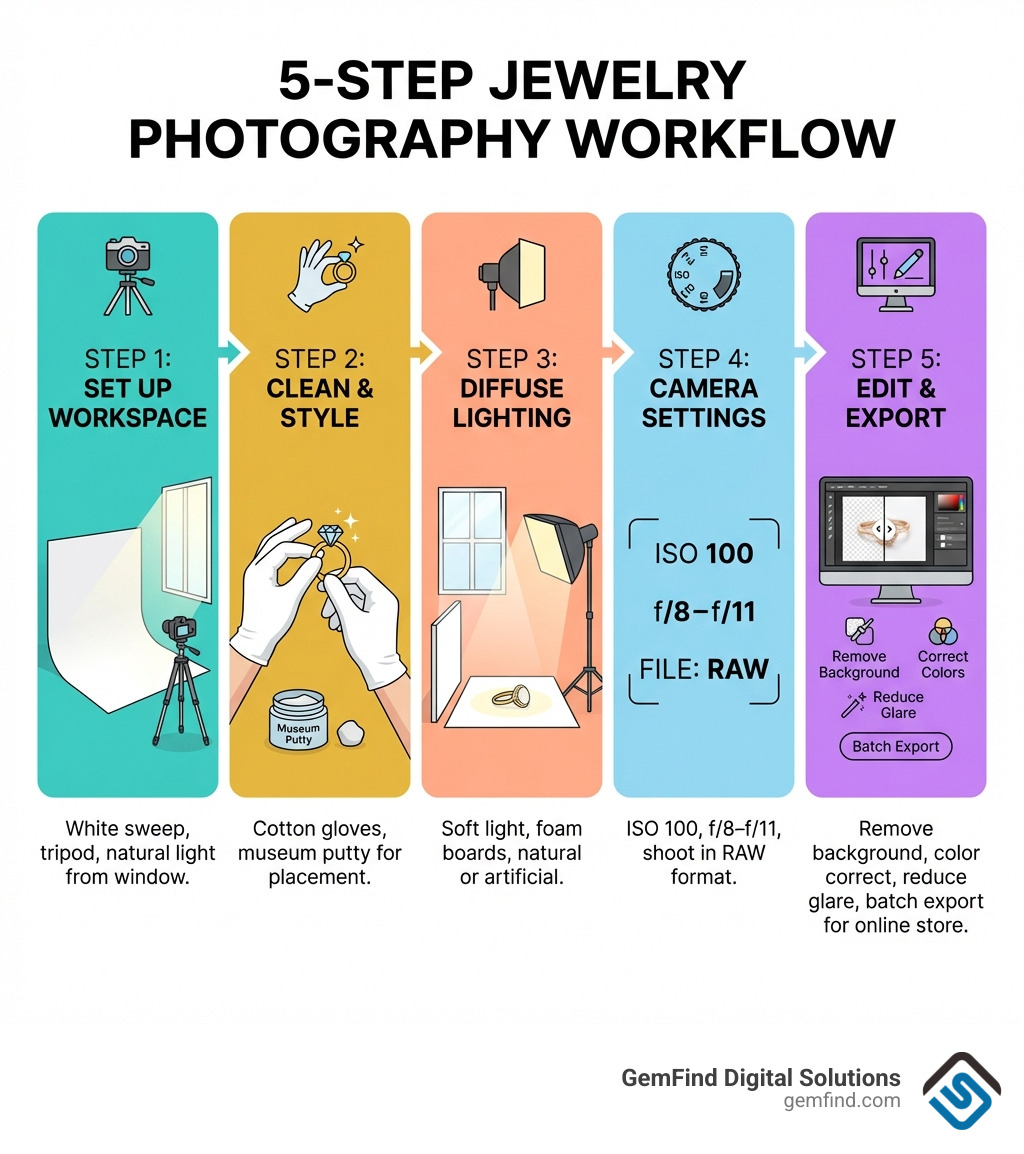
Here are the most important tips at a glance:
- Use soft, diffused light — natural window light or a softbox works best
- Shoot at ISO 100, f/8–f/11 for sharp, noise-free images
- Use a tripod to eliminate blur from camera shake
- Choose a simple background — white or neutral tones keep focus on the piece
- Clean your jewelry before every shoot — dust shows up clearly in high-res images
- Block reflections with white foam board or a light cone
- Edit in RAW for maximum flexibility in post-production
- Capture multiple angles including close-ups, 45-degree shots, and lifestyle images
The global jewelry market is worth around $348 billion. With that much at stake, your product photos aren't just pictures — they're your storefront window. A blurry, poorly lit image tells shoppers your brand isn't worth trusting. A crisp, well-lit photo of the same piece can make a $50 ring look worth $500.
The good news? You don't need a professional studio to get there. With the right setup, settings, and a bit of practice, you can create images that build trust, reflect your brand's quality, and convert browsers into buyers.
I'm Anthony Arechiga, Vice President of Sales at GemFind Digital Solutions, where I've spent over 15 years helping jewelry retailers grow their online presence — and I've seen how applying the right jewelry product photography tips can dramatically lift a store's conversion rates and perceived brand value. In this guide, I'll walk you through everything you need to go from frustrating snapshots to scroll-stopping product images.
Essential Equipment and Camera Settings
To get professional results, you need the right tools. While you don't need to spend $10,000 on a studio, certain items are non-negotiable for high-quality jewelry shots.
The Camera and Lens
While smartphones are better than ever, a Digital Single-Lens Reflex (DSLR) or mirrorless camera remains the gold standard for fine jewelry. We often recommend a solid workhorse like the Nikon D750. It offers the sensor size and manual control needed for high-resolution images.
However, the camera body is only half the battle. In jewelry photography, the lens is actually more important. You need a dedicated macro lens to capture tiny details like prongs, hallmarks, and gemstone facets. The Nikon AF-S VR Micro-NIKKOR 105mm is a favorite because it allows for 1:1 magnification, meaning you can get incredibly close without losing focus or creating distortion.
Stability is Key
You cannot hold a camera by hand when shooting jewelry. Even the slight movement of your heartbeat or breathing can cause "camera shake," resulting in a blurry image. We recommend Joby tripods or similar sturdy options to keep your camera perfectly still. This is especially important when you are using slow shutter speeds to let in more light.
Smartphone Photography: A Budget-Friendly Start
If you aren't ready to invest in a DSLR, don't worry. Recent smartphone models (iPhone 13+ or Samsung S21+) have incredible sensors. To make them work for jewelry, use a clip-on macro lens and a smartphone tripod.
| Feature | DSLR / Mirrorless | Smartphone |
|---|---|---|
| Image Detail | Exceptional (High-res RAW) | Good (Compressed) |
| Depth of Field | Precise Manual Control | Software-based (Portrait Mode) |
| Ease of Use | Steeper learning curve | Point and shoot |
| Cost | $1,500 - $3,000+ | Already in your pocket |
Regardless of the device, you must take control of your jewelry photography by moving away from "Auto" mode.
The "Golden" Camera Settings
To ensure your images are sharp and true-to-life, use these settings:
- ISO 100: Keeps the image "clean" and free of digital noise (graininess).
- Aperture (f-stop): Use f/8 to f/11. This provides a deep enough depth of field to keep the entire piece of jewelry in focus while maintaining sharpness.
- RAW Format: Always shoot in RAW rather than JPEG. RAW files preserve all the data from the sensor, giving you much more room to adjust exposure and color in editing.

Advanced jewelry product photography tips: Mastering focus stacking
A challenge in jewelry photography is that at close range, the depth of field is very shallow. You might find that the front of a ring is sharp, but the back of the band is blurry. This is where focus stacking comes in.
Focus stacking involves taking multiple photos of the same piece, each with a slightly different focus point (one on the front, one on the stone, one on the back). In post-production, you use Photoshop scripts to "Auto-align layers" and then "Auto-blend layers." Photoshop intelligently selects the sharpest parts of each image and merges them into one perfectly crisp photo. This is a must-learn technique for high-end ring photography where every detail needs to pop.
Expert Jewelry Product Photography Tips for Lighting and Reflections
Lighting is the most critical element of any photo. For jewelry, the goal is to create soft, even light that highlights the metal's luster without creating "hot spots" (harsh, bright white glares).
Natural vs. Artificial Light
- Natural Window Light: This is the most accessible and often the most beautiful light. Set up your table 90 degrees to a large window. If the sun is too bright, hang a sheer white curtain to act as a diffuser. The best time is usually midday when the light is bright but indirect.
- Softboxes and Light Tents: For consistency, artificial light is better. A softbox diffuses the light from a bulb, mimicking a cloudy day. Light tents (or "cubes") are great for beginners because they surround the jewelry in white fabric, diffusing light from all angles.
Managing Reflections
Jewelry is essentially a series of tiny mirrors. If you aren't careful, your camera, your tripod, and even your own reflection will show up in the polished metal.
- Use Foam Boards: White foam boards (bounce cards) are your best friend. Place them around the jewelry to "fill" shadows and reflect clean white surfaces back onto the metal.
- The "Lens Hole" Trick: You can use a large white poster board with a small hole cut out for your lens. This creates a white wall in front of the jewelry, blocking reflections with DIY tools like yourself and the room behind you.
- Light Cones: A specialized tool like a Light Cone can be placed directly over the jewelry, instantly creating 360-degree diffusion.
Don't forget to adjust your White Balance. If your white background looks yellow or blue, your white balance is off. Most cameras have a "Custom WB" setting — use a gray card or a white piece of paper to tell the camera what "true white" looks like under your specific lights. Following these tips for taking the best photos of jewelry for your website ensures your gold looks like gold and your silver doesn't look gray.
Jewelry product photography tips for capturing gemstone sparkle
Gemstones require a different touch than metal. While metal loves diffused light, stones need a little bit of "hard" light to create "fire" or sparkle.
- Color Temperature: Diamonds and silver generally look better with cooler light (around 5500K), while gold and warmer stones (like citrine) benefit from slightly warmer tones.
- Direct Sun for Opals: Most jewelry hates direct sunlight, but opals are the exception. Direct light helps bring out the "play of color" that makes opals unique.
- Facet Brilliance: To get that "twinkle," try adding a small, single LED "sparkler" light or a small reflector to bounce a tiny bit of direct light into the stone’s facets.
Styling, Composition, and Background Selection
How you present the jewelry is just as important as how you light it. You want to create a "vibe" that matches your brand while providing clear information to the buyer.
Choosing the Right Background
- Clean White: About 38% of jewelry companies use a clean white background. It’s the standard for marketplaces like Amazon and Google Shopping because it removes distractions and makes the product pop.
- Textured and Lifestyle: For social media or your homepage, use textured surfaces like marble slabs, linen, or wood. Replica Surfaces offers high-quality, portable backdrops that look like high-end materials but are lightweight and easy to clean.
- Props: Use props sparingly. A sprig of dried lavender or a marble ring cone can add context, but they should never overshadow the jewelry itself.
Staging Techniques
How do you make a ring stand up or a necklace lay in a perfect "U" shape?
- Museum Putty or Dental Wax: A tiny, pea-sized amount of clear museum putty can hold a ring upright on a flat surface. In the final photo, you can easily edit the putty out.
- Fishing Line: For hanging earrings, stretch fishing line across an empty picture frame. Hang the earrings on the line, and they will appear to "float" against your background.
- The 45-Degree Angle: This is the most popular angle for jewelry. It provides a sense of depth, showing the top and the side of the piece simultaneously.
Knowing how to best showcase your custom jewelry pieces on your website involves a mix of these technical staging tricks and creative styling.
Creating consistency across your jewelry product photography tips
Consistency builds trust. If one photo is warm and yellow and the next is cool and blue, your website will look amateur.
- Create a Style Guide: Document your setup. Write down the distance between the light and the jewelry, the camera height, and the specific props used.
- Uniform Lighting: Use the same lighting setup for every product in a category.
- Template Usage: When editing, use a template or "action" to ensure every image is cropped to the same size with the product centered in the same way. This creates a "seamless" scrolling experience for the customer.
Post-Production, Editing, and FAQs
No photo is perfect straight out of the camera. Post-production is where you turn a "good" photo into a "pro" photo.
The Power of Retouching
Even if you clean your jewelry with a microfiber cloth and wear cotton gloves, high-res cameras will still pick up tiny specs of dust or microscopic scratches on the metal.
- Background Removal: If you didn't get a perfect white background in-camera, use tools like Photoshop or AI-based background removers to create a pure white (#FFFFFF) canvas.
- Color Correction: Ensure the metal tones are accurate. Gold should look rich, not brassy.
- Shadow Addition: When you remove a background, the piece can look like it's "floating." Adding a subtle "contact shadow" or "reflection shadow" underneath the piece makes it look grounded and realistic.
- AI Retouching: About 85% of jewelry brands are now using AI to streamline their workflow. AI can help with batch editing, reducing the time and cost of manual retouching by up to 93%.
Investing time in enhancing your jewelry stores website with quality photography through careful editing is what separates the hobbyists from the professionals.
What is the best lighting setup for jewelry photography?
For most, a soft diffused light setup is best. This usually involves two softboxes placed at 45-degree angles to the product, or one large overhead softbox. If you're on a budget, a large window on an overcast day provides the perfect natural diffusion.
How do I avoid reflections on shiny metal?
The secret is controlling the environment around the jewelry. Use white foam boards to create a "tent" around the piece so it only has white surfaces to reflect. Use a "lens hole" in a piece of white cardstock to hide yourself and the camera from the reflection.
Can I take professional jewelry photos with a smartphone?
Yes! Modern smartphones are capable of incredible results. The key is to lock your focus and exposure (tap and hold on the screen), use a tripod, and use a macro attachment lens. Avoid using digital zoom, as it destroys image quality.
Conclusion
Mastering jewelry product photography tips is a journey of patience and precision. By focusing on stability, soft lighting, and consistent styling, you can create a visual identity that resonates with luxury and quality.
At GemFind Digital Solutions, we understand that great photography is just the beginning. To truly succeed in the $348 billion jewelry market, those images need to be housed on a high-performing website and backed by a strategic marketing plan. With over 25 years of industry-specific expertise, we are a proud Shopify and Google Partner, helping jewelers integrate everything from Edge POS systems to custom diamond search tools.
Ready to take your online store to the next level? More info about jewelry digital marketing services is just a click away. Let's make your jewelry shine online.


